The Rise of AI Editors as a New Trend
In recent years, one term consistently appears in discussions about development tools: AI editors. With the emergence of tools like GitHub Copilot, Cursor, and Windsurf, many developers have begun to argue that what we are experiencing is not just a feature upgrade, but the beginning of a new era. The claim is that code editors are no longer mere tools for entering text, but interfaces where developers collaborate with AI to produce code. This perspective is frequently emphasized in conferences and technical blogs, with some even describing it as a paradigm shift in software development.
There is certainly some validity to this argument. For example, GitHub Copilot goes beyond simple auto-completion—it can understand context and generate entire functions or implementation structures. Tools like Cursor go further, enabling developers to interact with AI directly within the editor to modify and refactor code. In the past, writing code was a task performed entirely by developers. Now, AI generates portions of code, and developers review and refine the results. This shift in workflow feels unfamiliar to many because it represents a gradual change in a development process that has remained largely consistent for decades.
However, this raises an important question: are AI editors truly a completely new paradigm, or are they simply the next step in the long evolution of development tools? Looking back at the history of software development reveals an interesting pattern. Many features we now take for granted—such as auto-completion, code analysis, and integrated development environments—were once introduced as innovations or paradigm shifts, only to become standard parts of the development environment over time.
For this reason, understanding AI editors requires more than focusing on the latest technology. It is more important to examine how code editors have evolved into their current form. The changes we see today did not appear suddenly; they are part of a continuous progression shaped over many years. In this article, we will follow that trajectory to explore whether AI editors represent something fundamentally new—or simply the next natural stage in the evolution of development tools.
The Origins of Code Editors — Simple Text Editing Tools
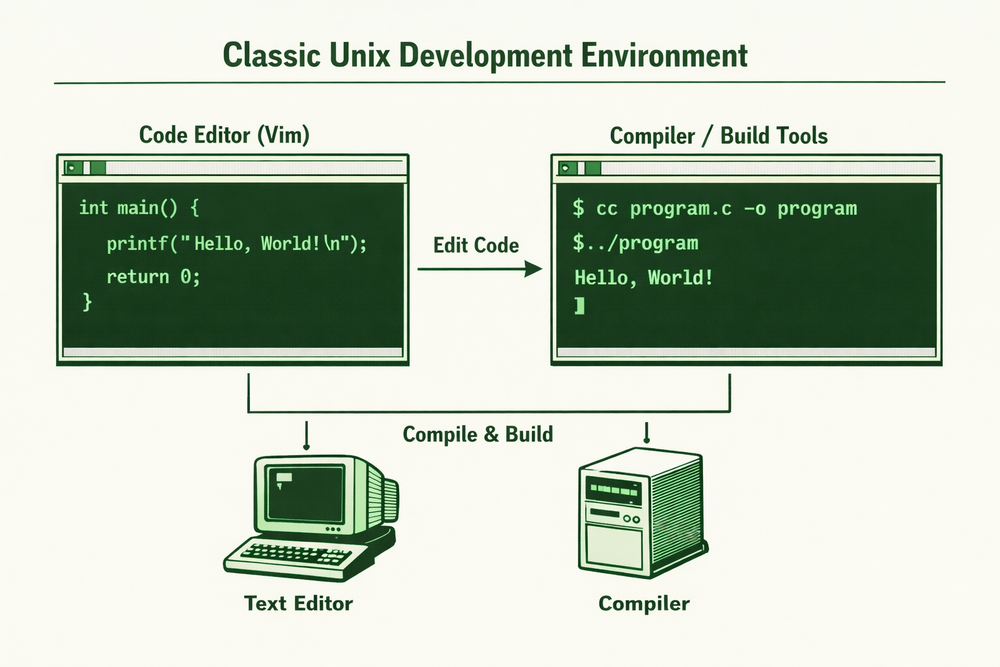
When we think about today’s development environments, code editors appear highly complex. But they were not always that way. In early computing environments, code editors were nothing more than tools for entering text. Source code was simply stored as text files, and developers would write code in an editor, then run a compiler separately to build the program. Editing, compiling, and execution were handled by different tools, requiring developers to move between them throughout their workflow.
A representative example can be found in Unix environments. Editors such as ed, vi, and nano, widely used on Unix systems, primarily provided basic text editing capabilities. Their core functions were opening files, modifying content, and saving changes. While these editors had powerful command systems, they were designed solely to make text editing more efficient. They did not understand code semantics or analyze program structures. The situation was not much different in Windows environments, where many developers used simple tools like Notepad for basic code editing tasks.
In such environments, development workflows were highly fragmented. Developers wrote code in a text editor, switched to a terminal to run compilation commands, and then returned to the editor to fix errors. Navigating multiple files or locating specific function definitions was not as straightforward as it is today. Developers often had to rely on memory or manual search commands. Although this may seem inconvenient by modern standards, it was a natural way of working at the time.
One defining characteristic of this era was the significant separation between code and tools. Editors were used for entering text, compilers for building programs, and debuggers for analyzing execution—each as independent programs. Developers had to move between them to complete their tasks. This separation is a crucial starting point for understanding the evolution of development tools, as the next several decades of innovation would largely focus on integrating these separate tools into a unified environment.
The Evolution of Editors — The Beginning of Automation
Over time, text editor–based development environments began to reveal their limitations. As programs grew larger and codebases became more complex, simple text editing was no longer sufficient for efficient development. Tasks such as locating the usage of a variable in thousands of lines of code or navigating function definitions within complex project structures became increasingly cumbersome. To reduce these repetitive efforts, developers began introducing various tools and features.
One of the earliest and most influential features was syntax highlighting. By displaying keywords, strings, and comments in different colors, it made the structure of code much easier to understand. While this may seem trivial today, it was a significant innovation at the time, greatly improving code readability. This was followed by auto-completion, which allowed developers to quickly enter variable and function names, and code navigation features that made it easier to locate specific functions or class definitions within a project.
As these features accumulated, code editors began evolving into tools that could understand more about the code itself. What started as simple text display programs gradually became tools capable of analyzing code structure and assisting developers. For example, editors began highlighting syntax errors or warning when a function was undefined. This marked a shift from pure text editing toward tools that could partially understand the meaning of code.
This transformation gradually blurred the boundary between code editors and development tools. With built-in code analysis, auto-completion, and navigation, developers could perform more tasks within a single program. This trend ultimately led to the emergence of the IDE—an effort to integrate editors, compilers, and debuggers into one unified environment. The next section will explore the rise of IDEs and the broader integration of development tools.
The Emergence of IDEs — Integrating Development Tools
As text editor–based environments continued to absorb more features, a point was reached where simple extensions were no longer enough. Tasks such as writing code, building, running, debugging, and testing were still performed across separate programs, making workflows fragmented and inefficient. Developers had to write code in an editor, switch to a compiler, check results, and return to the editor to make changes. As software grew in size, this process became increasingly cumbersome. The need to constantly move between tools created friction in the development process. To address this problem, the concept of the IDE (Integrated Development Environment) emerged.
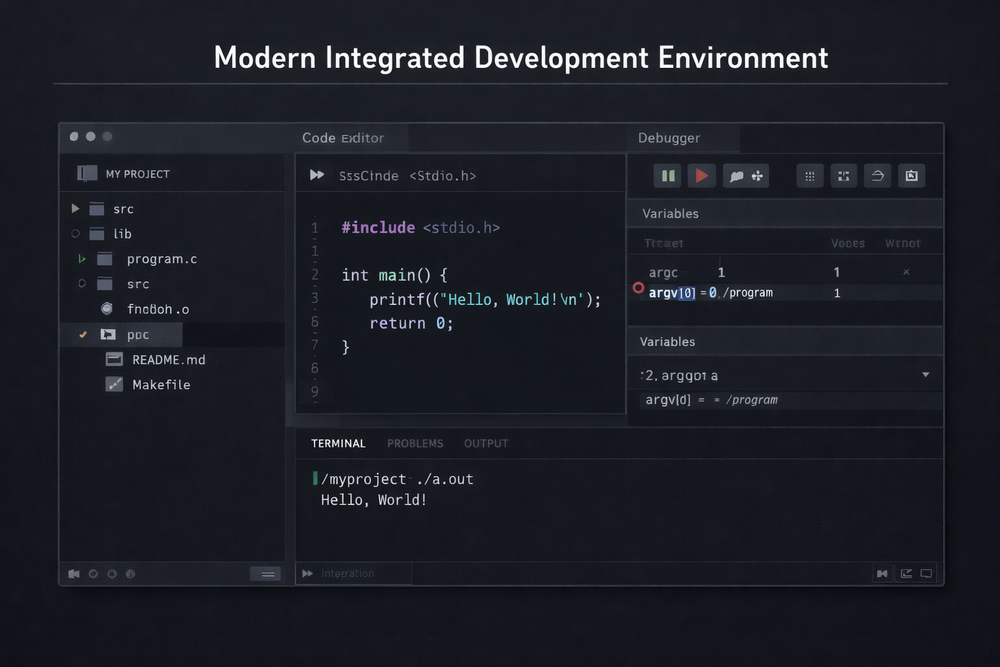
An IDE, as the name suggests, integrates various development tools into a single environment. Code editors, compilers, debuggers, build systems, and project management features are all combined within one application. Tools like Visual Studio, Eclipse, and IntelliJ exemplify this approach. Developers can now write code, build programs, and perform debugging within a unified interface. They can monitor execution states in real time and inspect variable values directly inside the IDE. This was more than just an increase in features—it represented a fundamental shift in the structure of the development environment.
The rise of IDEs significantly changed how developers worked. Instead of switching between multiple programs, most tasks could now be completed within a single window. Features like code navigation, refactoring tools, and auto-completion became seamlessly integrated. Developers could refactor code or rename variables across an entire project with just a few clicks. These capabilities not only improved convenience but also influenced how developers think. Rather than managing individual text files, they began to view the entire project as a unified system.
However, the evolution of IDEs introduced new challenges. While powerful, IDEs were often heavy and complex. Many required significant system resources and were optimized for specific languages or frameworks. For some developers, this made the environment feel overly cumbersome. Those who preferred fast, lightweight editors often found IDEs too heavy for their needs. This tension led to the emergence of another direction in development tools—the transformation of editors into platforms.
After VS Code — Editors Became Platforms
While IDEs established themselves as powerful tools for integrating development environments, many developers still wanted lightweight and flexible editors. Visual Studio Code emerged at the intersection of these needs. When it was first introduced, VS Code was closer to a lightweight code editor than a full IDE. It was fast, simple, and designed with an extensible architecture that supported multiple languages. Over time, however, it evolved into something far beyond a basic editor.
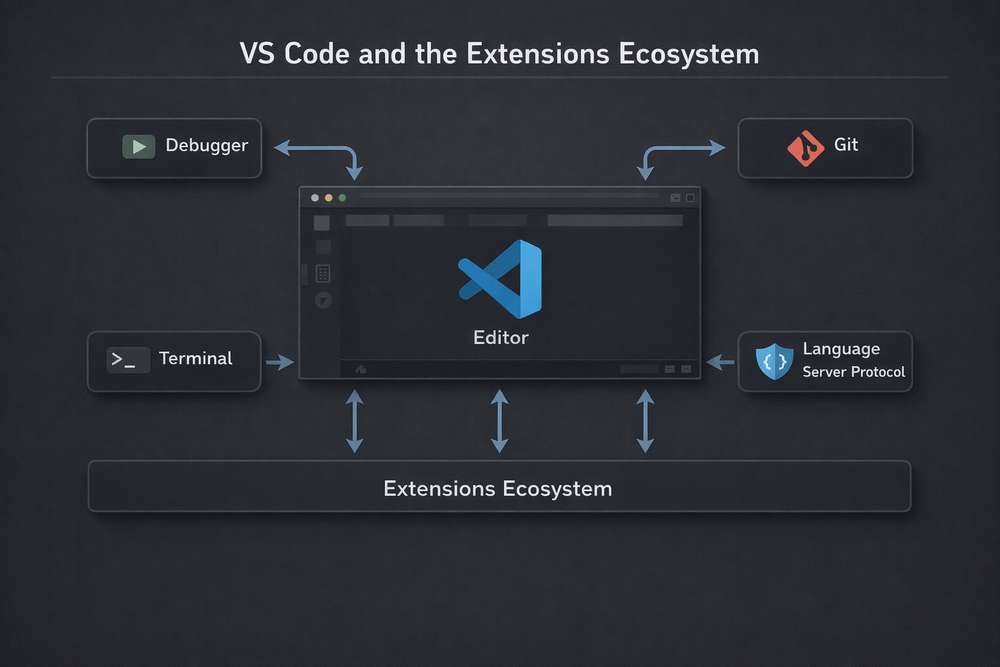
The core of VS Code is its extension system. The editor itself remains relatively minimal, while additional functionality can be added through extensions. Developers can install language-specific support, debugging tools, testing frameworks, and Git integration as needed. This design allows VS Code to adapt to a wide range of development environments, unlike traditional IDEs that are often tied to specific languages or ecosystems. The editor stays lightweight, but can scale into an IDE-level environment when required.
A key technical shift in this evolution was the introduction of the Language Server Protocol (LSP). LSP separates code intelligence—such as analysis, auto-completion, and navigation—into a dedicated language server process. The editor acts as an interface, while the language server handles the actual analysis. This architecture standardizes support for multiple programming languages and allows developers to use different languages within the same editor, adding capabilities through extensions.
As a result, VS Code transformed into a development platform rather than just an editor. With thousands of extensions and tools operating within it, the center of the development environment began to shift toward the editor itself. Developers were no longer tied to a specific IDE—they could build their own customized environments around the editor. This shift expanded the role of code editors once again and laid the foundation for the emergence of AI-powered development tools that would follow.
The Emergence of Copilot — The Beginning of Code Generation
After platform-based editors like VS Code became the center of development environments, another major shift emerged: AI-powered code generation tools. Among them, the most influential was GitHub Copilot. Copilot operated in a fundamentally different way from traditional auto-completion. Earlier auto-completion simply helped developers type variable or function names more quickly. In contrast, Copilot could understand context and suggest entire functions or even full algorithmic implementations.
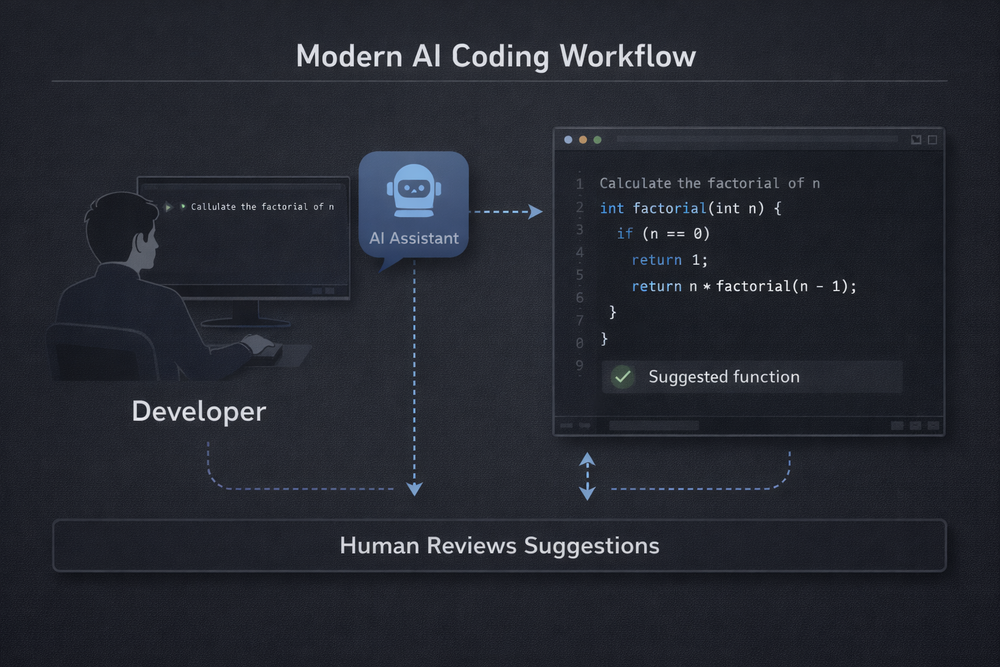
For example, when a developer writes a simple description as a comment, Copilot can generate actual code based on that description. It can propose data processing functions, sorting algorithms, API calls, and more. This created a completely new experience for developers. Writing code no longer felt like a purely manual task—it began to resemble a collaborative process with AI. Developers no longer needed to write every line themselves; instead, they could review and refine code generated by AI.
With the introduction of Copilot, subtle changes began to appear in developer workflows. Instead of designing and implementing everything from scratch, many developers started by writing brief descriptions or code skeletons and then reviewing AI-generated suggestions. This shift reflects a gradual change in the role of the developer. It is no longer just about writing code, but also about understanding and evaluating AI-generated results.
This transformation became the starting point for a new wave of AI-driven development tools. While Copilot initially functioned as a plugin within existing editors, later tools began building editors centered entirely around AI. Tools like Cursor and Windsurf integrate code editing with AI-driven interaction in a single environment. This signals a broader shift: code editors are evolving from simple editing tools into intelligent development interfaces. The next section will explore how these AI-centered editors are structured and how they differ from traditional IDEs.
Cursor and Windsurf — The Emergence of AI-Centric Editors
When GitHub Copilot first appeared, many developers understood it as a powerful IDE plugin. In practice, Copilot functioned as an auxiliary tool within existing editors. Developers still wrote code themselves, while AI provided suggestions during the process. However, over time, a new class of development tools began to emerge. Tools like Cursor and Windsurf did not simply add AI features to editors—they were designed around interaction with AI as a central concept.
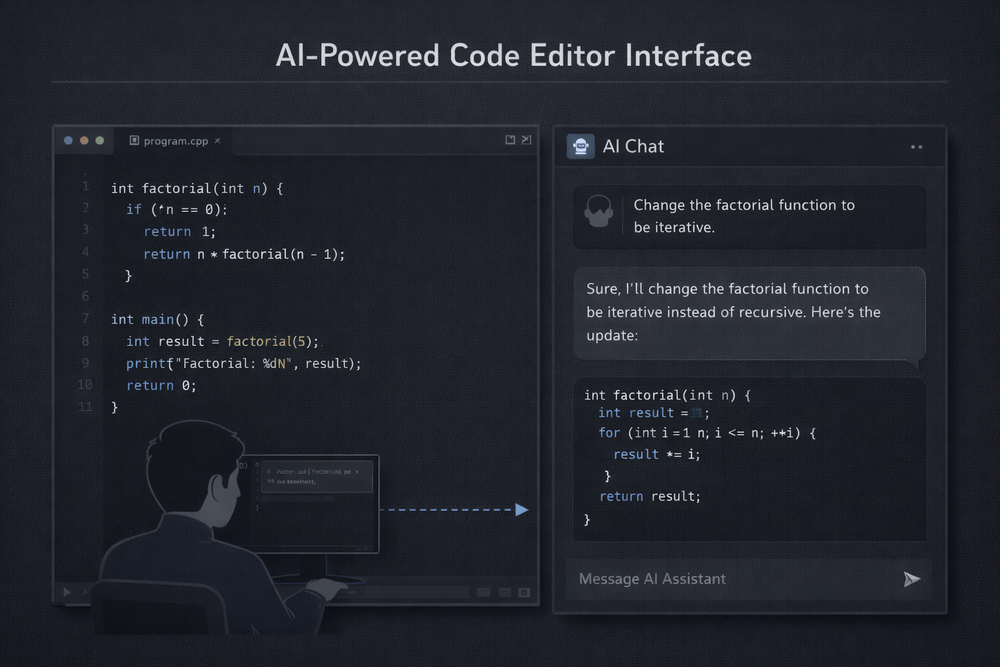
The most notable difference lies in the interface itself. In traditional code editors, the code editing window was central, while features like auto-completion and analysis tools operated in a supporting role. In contrast, AI-centric editors treat the code editor and the AI interaction interface as equally important. Instead of directly modifying code, developers can select a block and issue requests such as “make this more efficient” or “refactor this into a testable structure.” The AI analyzes the request and proposes revised code. In this workflow, developers shift from writing detailed implementations to describing intent and evaluating outcomes.
This shift in interface represents more than just additional functionality. It signals that code editors are evolving from simple editing tools into interactive systems. Developers can now collaborate with AI through conversation—asking it to analyze specific files, explain project structures, or generate and modify code. This is fundamentally different from traditional IDE features like auto-completion or code navigation. Instead of directly manipulating code, developers begin to guide and orchestrate the entire code generation process.
This transformation is already influencing how code is written. Many developers are starting with problem descriptions rather than complete implementations, reviewing and refining AI-generated results. This indicates that programming is gradually becoming more design-centric. While code remains important, the time spent manually writing detailed implementations is decreasing. This trend suggests that AI-centric editors are not merely an extension of existing IDEs, but an attempt to reshape the very structure of the development interface itself.
Are AI Editors Truly a New Paradigm?
The rise of AI-centric editors may feel like a sudden and dramatic shift. With models capable of generating code, some even question whether the role of developers might disappear. However, when viewed through the longer history of development tools, this change is less of a complete break and more likely a continuation of a long-standing trend toward automation.
Programming languages and development tools have consistently evolved to reduce repetitive work for developers. Early computers required direct input of machine code, which was later abstracted by assembly languages. High-level languages like C further removed the need to deal with low-level hardware instructions. Over time, features such as auto-completion and code analysis tools emerged, and IDEs enabled complex refactoring tasks to be automated. All of these advancements followed the same trajectory: reducing the amount of code developers needed to write manually.
Seen in this context, AI code generation is not entirely new, but rather the next step in this progression. Previously, developers wrote the structure of functions themselves, with auto-completion assisting in small portions. Now, AI can propose entire implementations. In other words, the scope of automation has expanded. Technically, this can be understood as an extension of code analysis and auto-completion technologies into full code generation.
That said, it would be inaccurate to dismiss AI editors as merely an extension of auto-completion. There is a meaningful shift occurring at the interface level. IDEs, which were traditionally centered around code editing, are increasingly evolving into conversation-driven interfaces. Developers can now describe intent in natural language, and the system translates that into code. This represents a fundamentally different experience from traditional development environments. At this point, AI editors demonstrate the potential to go beyond automation tools and become a new kind of development interface.
The Changing Role of Developers — From Writing Code to Designing Systems
As AI code generation tools continue to advance, discussions about the role of developers have become more active. Many assume that if AI can generate code, the role of developers will diminish or even disappear. However, what is actually happening in real development environments points in a different direction. Rather than eliminating the role of developers, these tools are shifting it toward higher-level work.
For example, developers using tools like Copilot or Cursor still need to design the overall structure and architecture of a system. AI can generate specific functions or algorithms, but defining the system as a whole—how components interact and how responsibilities are distributed—remains a human responsibility. In addition, developers must verify whether AI-generated code aligns with project requirements and ensure that it meets performance and security standards. These tasks demand not just coding ability, but a deep understanding of systems and strong design judgment.
This shift also affects how developers work. In the past, much of a developer’s time was spent writing detailed implementations. With the rise of AI tools, the focus is increasingly moving toward problem definition and structural design. Developers first outline the system architecture and define the required functionality, then use AI tools to generate implementations quickly. The process continues with reviewing and refining the generated code. This is similar to how the role of developers evolved with the introduction of compilers and high-level programming languages.
Ultimately, the rise of AI editors is more likely to expand the role of developers rather than replace it. While coding skills remain important, the ability to understand problems structurally and design systems is becoming even more critical. Developers are no longer just people who write code, but those who design complex systems and connect multiple technologies. This shift forces a reconsideration of what skills will matter most in future development environments.
Conclusion — The Next Stage of Text Editors
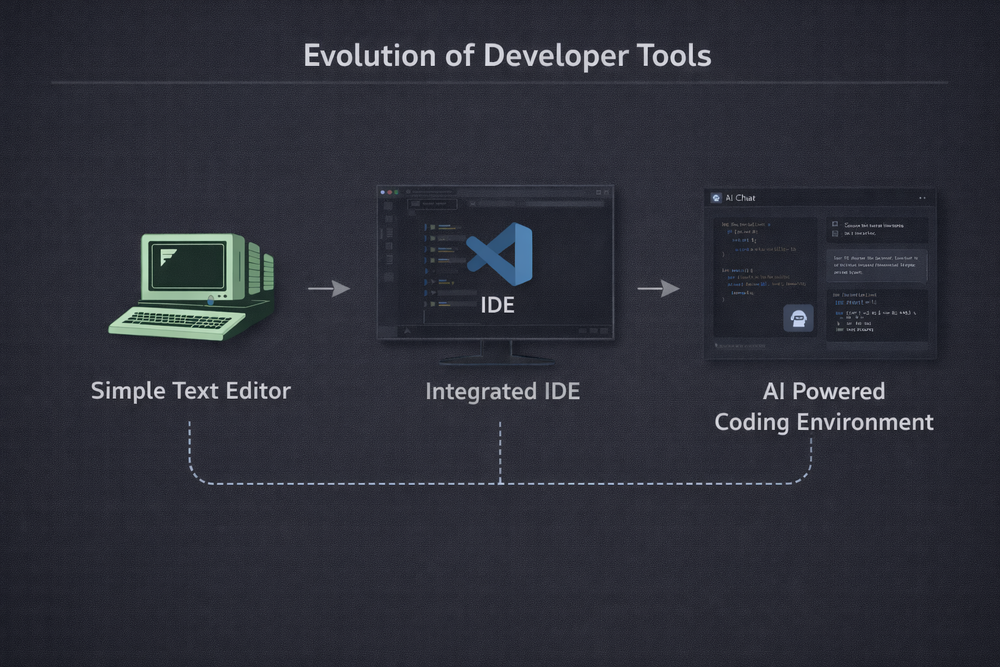
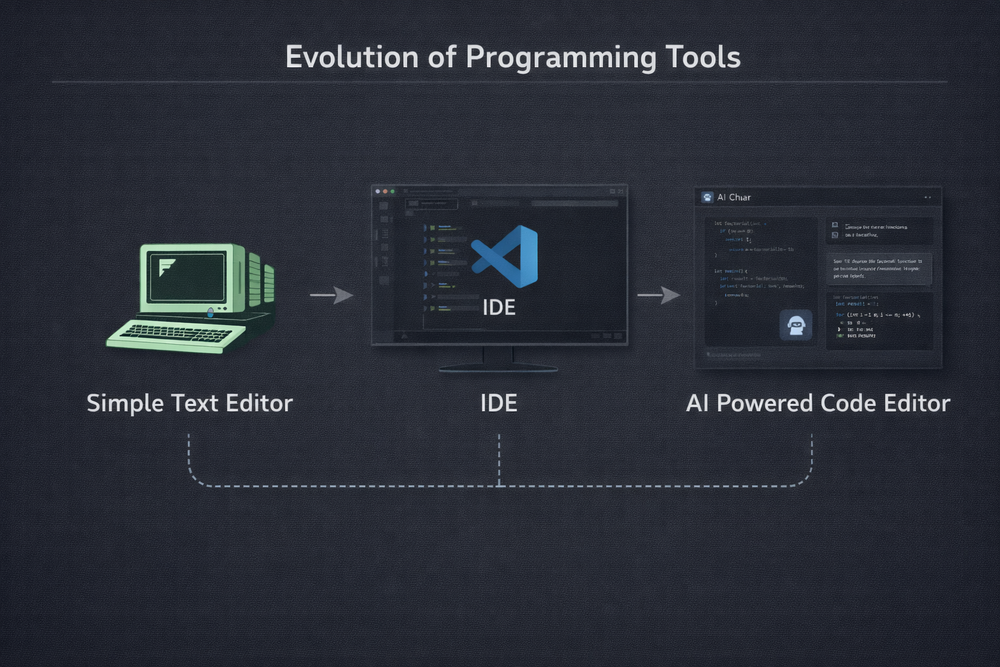
Looking back at the progression outlined above, the evolution of code editors was never a sudden event. Development tools that began as simple text editors gradually incorporated automation features and eventually evolved into integrated environments known as IDEs. With the emergence of tools like VS Code, editors transformed from simple programs into extensible development platforms. Now, we stand at the next stage of that evolution. As AI begins to directly participate in the coding process, editors are becoming increasingly intelligent development interfaces. This shift is not merely the introduction of new features, but rather the continuation of a long-standing trajectory in the evolution of development tools.
At this point, one striking observation remains: text is still at the center of everything. Code is text, configuration files are text, and documentation and logs are also text. Even interaction with AI largely occurs through text-based interfaces. Workflows that combine natural language prompts with code blocks have become a core part of modern development environments. In this sense, the text editor is not disappearing; instead, it is expanding as the central interface of software production. What was once a simple input window has evolved into a platform that encompasses code generation, analysis, modification, and collaboration.
This transformation is likely to have a significant impact on future development environments. As AI code generation continues to improve, developers will be able to automate more aspects of implementation. However, this does not diminish the role of developers. On the contrary, developers are likely to focus even more on designing system architectures, connecting technologies, and solving complex problems. While code writing itself may be automated, the ability to understand and design systems will remain a fundamentally human responsibility. In this context, the code editor will evolve beyond a simple editing tool into a central interface where developers design systems and collaborate with AI.
Ultimately, the concept of an AI editor is better understood not as a completely new tool, but as the next stage in the evolution of development tools. What began as a simple text editor evolved into an IDE, and is now transforming into an environment where humans collaborate with AI. This trajectory is likely to continue. In a few years, even today’s code editors may appear outdated. Yet one thing is unlikely to change: the most fundamental interface for creating software will remain text. And the tools that handle that text will continue to occupy the center of the development environment.