
1. Definition / Conclusion
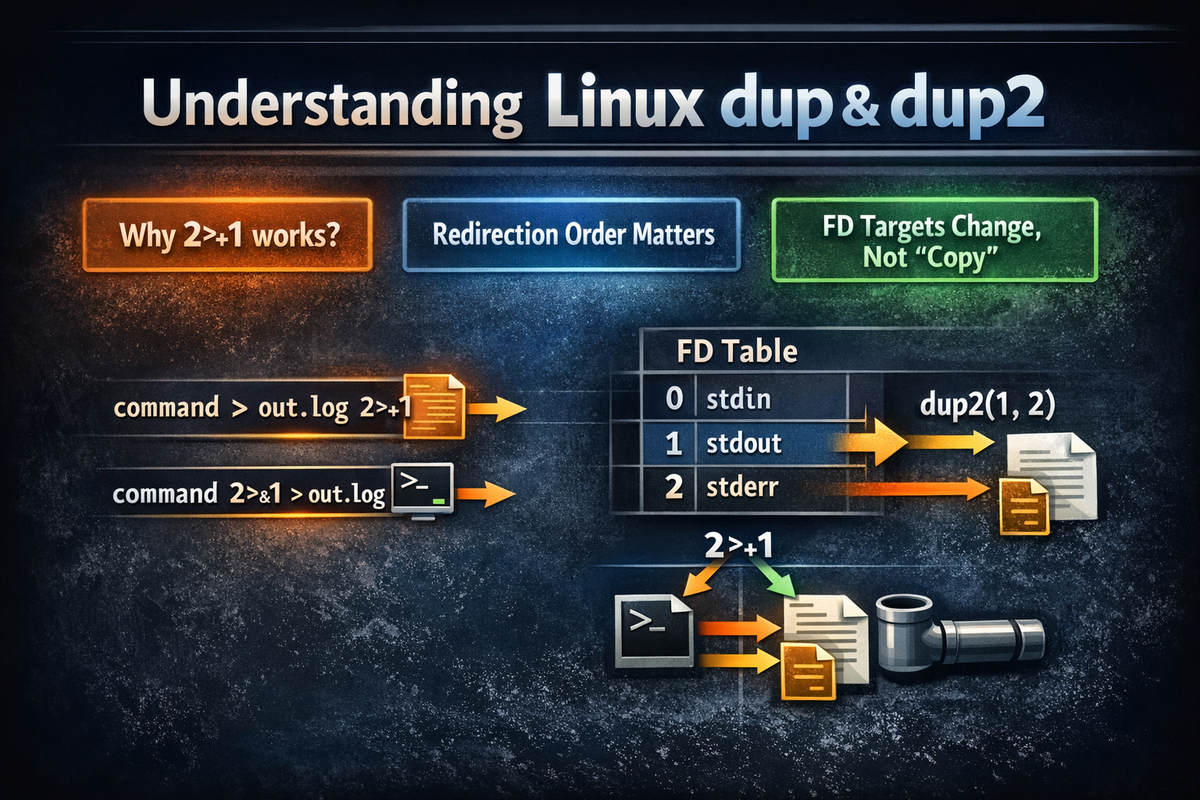
dup and dup2 are system calls that duplicate file descriptors or reassign them to a specific number. And shell redirection syntax—especially 2>&1—must be understood internally through this exact FD reassignment concept. The core of this article is not to list system call APIs. The real point is to explain structurally why 2>&1 behaves the way it does, why redirection order changes the result, and why it feels different from what people learned as “copying.”
Many explanations stop at saying 2>&1 means “send stderr to stdout.” This is not incorrect, but it misses something critical. More precisely, 2>&1 changes stderr (fd 2) so that it points to whatever stdout (fd 1) is currently pointing to. In other words, it does not copy something and send it to two places. Instead, it reassigns the connection target of fd 2 based on fd 1.
The reason this perspective matters is very simple. Once you understand this, you can explain whycommand > out.log 2>&1
andcommand 2>&1 > out.log
produce different results. Without this structural understanding, 2>&1 becomes something you memorize but still get wrong when redirection order changes.
Ultimately, this article translates redirection syntax from a “string-level grammar” into a process-level FD state change operation.
2. Key Summary
A Linux process starts with several representative file descriptors.
0 is standard input (stdin), 1 is standard output (stdout), and 2 is standard error (stderr). Shell redirection syntax is ultimately about changing what these numbers point to. Whether output appears on the screen, gets written to a file, or flows through a pipe is not a property of the string itself, but a result of what fd 1 and fd 2 are pointing to at that moment.
dup(fd) duplicates an existing FD and creates a new FD number.dup2(oldfd, newfd) makes newfd point to the same target as oldfd.
The key point here is that what gets duplicated is not data. The output string is not copied. What changes is the connection relationship inside the process’s FD table.
The shell’s 2>&1 is conceptually equivalent to dup2(1, 2). That is, it does not turn stderr into stdout itself. Instead, it makes fd 2 point to whatever fd 1 is currently pointing to. On the other hand, > opens a file and changes stdout’s target to that file.
So one is a direct target reassignment,
and the other is a linking operation based on another FD.
This single difference is what splits redirection behavior based on order.
3. Why It Matters
3-1. Problem: You memorize 2>&1, but fail when order changes
Many users memorize 2>&1 as “a syntax that also saves errors.” This is how it is often explained in practice. The problem is that this level of understanding collapses as soon as the syntax changes slightly. A representative example is the following two commands:
command > out.log 2>&1
command 2>&1 > out.log
At a glance, they look almost identical. Both involve stdout, stderr, and out.log. Both seem like they are “connecting output to a file.” However, the actual results are different. In the first case, both stdout and stderr can go into out.log. In the second case, usually only stdout goes into the file, while stderr remains on the terminal.
This difference cannot be explained through memorizing syntax. Saying “put it in front” or “put it after” does not explain why. As soon as the context changes, confusion returns. The real issue is that the user memorized 2>&1 as a result, not as a process of FD state transformation.
3-2. Limitation of common explanations: “merge” is not accurate
A common explanation for 2>&1 is that it “merges stdout and stderr.” While this may work as a practical shortcut, it actually becomes misleading when trying to understand the structure. This phrasing suggests that two streams are somehow combined in an abstract space. In reality, that is not how it works.
The actual behavior is much more concrete. 2>&1 does not merge streams in the air. It reassigns fd 2 to point to whatever fd 1 is currently pointing to. So instead of “merging,” it is closer to “reassignment.”
Missing this distinction leads to three recurring misunderstandings.
First, you cannot understand why order matters.
Second, you confuse “copy” with “reference.”
Third, you end up understanding the difference between redirection and pipes only intuitively.
That is why, instead of thinking “they are merged,” you must repeatedly ask:
what is pointing to what, based on the current state?
Once you adopt this perspective, the syntax suddenly becomes much less mysterious.
3-3. Solution: Look at FDs, not output text
Many beginner explanations of Linux I/O focus on “where the string goes.” This is acceptable at an introductory level. But once you deal with 2>&1, redirection order, pipes, or FD backups, you can no longer rely on that model. From that point on, you must look at what each file descriptor is pointing to.
dup2 is the system call that exposes this structure most directly. It does not say “write this string somewhere.” Instead, it operates at the level of which target a specific FD number should refer to. This is the actual mechanism behind redirection. Shell syntax may look simple, but internally it performs this kind of FD rearrangement.
In other words, this article is not just introducing dup and dup2 as system programming concepts. It does the opposite. It translates familiar shell syntax—such as >, 2>, 2>&1, and |—into the underlying FD structure.
Once this translation is internalized, redirection is no longer something to memorize. It becomes something you can reason about and explain.
4. The Basic Structure of File Descriptors and dup, dup2
A file descriptor is an integer handle used by a process. In general, a process does not directly hold I/O targets, but instead references them through numeric identifiers. The most well-known are 0, 1, and 2, which represent stdin, stdout, and stderr. However, an important point here is that you should not assume file descriptors refer only to files, despite the name.
The range of targets an FD can point to is much broader. It can be a terminal, a regular file, a pipe, a socket, or a device file. In other words, an FD is not a “file-only number,” but a unified handle that a process uses to reference I/O targets. This is the core abstraction of Linux I/O.
dup(fd) creates a new FD that shares the same open target as the given FD.dup2(oldfd, newfd) makes newfd point to the same open target as oldfd. If newfd is already open, it is closed first and then reused.
What must be emphasized here is that these functions do not copy data. They are not functions that “send output strings somewhere else.” More precisely, they modify the connection entry that a specific FD number refers to. This is the true nature of redirection.
Consider the following short example:
#include <unistd.h>
#include <stdio.h>

int main() {
    int newfd = dup(1);  // duplicate stdout (fd 1)
    dprintf(1, "to stdout\n");
    dprintf(newfd, "also to same target as stdout\n");
    return 0;
}
In this code, newfd created by dup(1) points to the same target as stdout. If the program runs in a terminal, both outputs will likely appear on the terminal. The key point is that newfd does not create a completely new independent device. It is simply another FD number that shares the same open target.
In other words, newfd does not have its own separate output world. It simply looks at whatever stdout was originally pointing to. This intuition is critical. Only with this understanding does 2>&1 start to make sense. Making stderr the same as stdout means making them point to the same target, not “branching output to multiple places.”
5. The Difference Between dup and dup2
Although dup and dup2 look similar, their actual use cases are clearly different.dup(fd) duplicates the given FD and returns the lowest available new FD number. It performs duplication, but you cannot choose which FD number to attach it to. This makes it useful for understanding structure, but limited when you need to control specific FD numbers, as in shell redirection.
On the other hand, dup2(oldfd, newfd) guarantees that the result is attached to newfd. This is the critical difference. When a shell deals with stdout, it must always modify fd 1. When dealing with stderr, it must always modify fd 2. In other words, the goal is not to “get a new number,” but to replace what a specific number is pointing to. This is exactly what dup2 does.
It becomes clear why shells need dup2 when you think about redirection. Redirection is not about “creating an additional output capability.” stdout must always remain fd 1, and stderr must always remain fd 2. What changes is what those fixed numbers point to—a file, a pipe, or a terminal. This requirement aligns precisely with dup2, not dup.
Consider the following example:
#include <unistd.h>
#include <stdio.h>

int main() {
    int copied = dup(1);      // e.g., 3
    dup2(1, 2);               // make stderr (2) point to same target as stdout (1)

    dprintf(copied, "written via copied fd\n");
    dprintf(2, "written via stderr, but now same target as stdout\n");
    return 0;
}
In this code, copied usually becomes a number greater than or equal to 3. This means dup(1) created a new FD that points to the same target as stdout. In contrast, dup2(1, 2) changes fd 2 so that it points to the same target as fd 1. In other words, stderr is now directed to whatever stdout currently targets. This directly corresponds to the shell’s 2>&1.
This difference can be summarized as follows.
dup is closer to “adding a new number that points to the same target.”
dup2 is closer to “overwriting what a specific number points to.”
In shell redirection, the latter is almost always what matters.
6. The Real Identity of 2>&1
Now we move to the core. 2>&1 is not a syntax that “copies stderr to stdout.” That expression is not precise. Conceptually, it should be understood as:
dup2(1, 2);
The meaning is clear. Based on where fd 1 is currently pointing, fd 2 is made to point to the same place. The key word here is “current.” 2>&1 does not create a vague relationship. It performs a reassignment based on what fd 1 is pointing to at that exact moment.
There is one sentence that must always be remembered:
The key is always where stdout is pointing at that moment.
Without this perspective, misunderstandings persist. For example, some people think: “Then if I write to stdout, will it also be copied to stderr?” No. There is no such branching. Others assume: “If I use 2>&1 once, will stderr automatically follow future changes to stdout?” That is also incorrect. 2>&1 is not a dynamic alias. It is a one-time reassignment based on the state at execution time.
Consider the following:
command > out.log 2>&1
Conceptually, this can be understood as:
- Open
out.logand connect fd 1 (stdout) to that file. - Connect fd 2 (stderr) to whatever fd 1 is currently pointing to.
The result is that both stdout and stderr go to out.log.
Now compare it with this:
command 2>&1 > out.log
Conceptually, this becomes:
- Connect fd 2 (stderr) to whatever fd 1 (stdout) is currently pointing to.
At this moment, it is usually the terminal. - Connect fd 1 (stdout) to
out.log.
The result is that only stdout goes to out.log, while stderr remains on the terminal.
In other words, 2>&1 does not track future stdout. It only performs a one-time reassignment based on the current state of stdout. This is why redirection order matters. Order matters because each step is applied based on the FD state established by previous steps.
7. Why Redirection Order Matters
Many people look atcommand > out.log 2>&1
andcommand 2>&1 > out.log
and assume that since they contain similar components, the results will also be similar. This intuition is wrong. And the reason it is wrong is clear. Redirection is not a declarative statement, but a sequence of state changes applied step by step.
The core misunderstanding is this: treating 2>&1 as if it establishes some kind of “permanent relationship.” In reality, it does not. 2>&1 is a momentary operation that changes fd 2 based on the current state of fd 1. Therefore, whether stdout has already been redirected to a file or is still pointing to the terminal determines the final outcome.
Let’s look at an experiment to make this clearer.
python3 -c 'import sys; print("OUT"); print("ERR", file=sys.stderr)' > out.log 2>&1
cat out.log
The expected result is:
OUT
ERR
Now change the order:
python3 -c 'import sys; print("OUT"); print("ERR", file=sys.stderr)' 2>&1 > out.log
cat out.log
In this case, out.log usually contains only:
OUT
ERR is printed on the screen. The reason is that when 2>&1 is executed first, fd 1 is still pointing to the terminal. After that, even if stdout is redirected to a file, stderr does not automatically follow.
At this point, the key must be emphasized again.2>&1 is not a dynamic alias, but a one-time reassignment operation.
That is why the assumption “changing the order won’t matter much” becomes the most common mistake.
8. Examples
Example 1. Duplicating stdout
#include <unistd.h>
#include <stdio.h>

int main() {
    int fd = dup(1);
    dprintf(1, "stdout line\n");
    dprintf(fd, "dup stdout line\n");
    return 0;
}
The result is usually that both lines are printed to the terminal. The reason is simple. The FD obtained through dup(1) shares the same open target as stdout. In other words, the FD does not create a new output device. It is simply another number that writes to the same place as stdout.
From a practical standpoint, this example is important because it prevents misunderstanding dup as a “function that copies output.” What is actually duplicated is not the string, but the connection structure. Therefore, dup should be understood as “adding a new FD number that points to the same open target,” not “creating a new output channel.”
Example 2. Sending stderr to the same place as stdout
#include <unistd.h>
#include <stdio.h>

int main() {
    dup2(1, 2);
    dprintf(1, "normal output\n");
    dprintf(2, "error output redirected to stdout target\n");
    return 0;
}
In this case, stdout and stderr go to the same place. If the program is executed in a terminal, both will appear on the screen. If stdout has already been redirected to a file, both may go into that file. The key reason is that dup2(1, 2) makes fd 2 point to the same target as fd 1.
The practical meaning of this example is clear. It demonstrates the essence of 2>&1. Although it appears as if stderr is “merged” into stdout, what actually happens is that fd 2 is reassigned to share the current destination of fd 1.
Example 3. Redirection to a file followed by dup2
#include <unistd.h>
#include <fcntl.h>
#include <stdio.h>

int main() {
    int filefd = open("out.log", O_WRONLY | O_CREAT | O_TRUNC, 0644);
    dup2(filefd, 1);  // stdout -> file
    dup2(1, 2);       // stderr -> same file

    dprintf(1, "stdout to file\n");
    dprintf(2, "stderr also to file\n");
    close(filefd);
    return 0;
}
The result is that both stdout and stderr are written to out.log. The reason lies in the order. First, stdout is redirected to the file. Then stderr is aligned with whatever stdout is currently pointing to, which is now the file.
In practical terms, this example corresponds exactly to the following shell command:
command > out.log 2>&1
In other words, it is not enough to remember this as “send output to a file and include errors.” More precisely, it should be understood as: first change fd 1 to point to the file, then reassign fd 2 to match fd 1’s current target.
Example 4. When the order is reversed
#include <unistd.h>
#include <fcntl.h>
#include <stdio.h>

int main() {
    int filefd = open("out.log", O_WRONLY | O_CREAT | O_TRUNC, 0644);

    dup2(1, 2);       // stderr -> current stdout (terminal)
    dup2(filefd, 1);  // stdout -> file

    dprintf(1, "stdout to file\n");
    dprintf(2, "stderr still to terminal\n");
    close(filefd);
    return 0;
}
In this case, only stdout goes to the file, while stderr remains on the terminal. The reason is that when dup2(1, 2) is executed, stdout is still pointing to the terminal. Based on that state, stderr is connected to the terminal. After that, only stdout is redirected to the file.
This example directly explains the following shell command:
command 2>&1 > out.log
And the importance of this example is that it directly breaks the most common misconception. Redirection order is not a cosmetic detail of syntax, but the actual execution order that determines FD state transitions.
9. Practical Applications
Practical Application 1. Merging logs into a single file
In batch jobs or background processes, it is often useful to collect stdout and stderr into a single file. If output and errors are separated, debugging becomes cumbersome and the chronological sequence can be lost. In such cases, you can write:
./batch_job > batch.log 2>&1
This ensures that both normal output and error output are written into the same file. What matters is not just the result of “merging,” but why it works. First, stdout is redirected to batch.log. Then stderr is reassigned to the current target of stdout, so both streams end up in the same file.
Practical Application 2. Saving results to a file while keeping errors on screen
In contrast, there are many cases where you want to save normal output to a file while keeping errors visible on the screen. This is common in batch pipelines where the result file is used by subsequent steps.
./job > result.txt
This writes only stdout to the file, while stderr remains on the terminal. If you also want to store errors separately, you can write:
./job 2> error.log > result.txt
The advantage of this pattern is that it keeps data and errors separated. stdout represents the result, while stderr represents the cause of failure. Mixing everything into a single stream can corrupt the result file and break downstream processing.
Practical Application 3. Handling errors separately in pipelines
In pipelines, it is often necessary to pass only stdout to the next command while handling stderr separately. For example, to maintain data flow while storing errors in a separate file:
command 2> error.log | grep something
In this case, stdout flows through the pipe into grep, while stderr is written to error.log. The key point here is that pipes pass only stdout to the next process by default. Therefore, if you want to prevent errors from contaminating the data stream, this separation is necessary.
This example also shows that redirection and pipes are not entirely separate constructs. Both are ultimately about which target each FD is connected to.
Practical Application 4. Backing up file descriptors in shell scripts
A more advanced pattern involves backing up the original stdout and restoring it later. For example:
exec 3>&1
exec > output.log
echo "this goes to log"
echo "this goes to original stdout" >&3
exec 3>&-
The meaning of this code is clear. First, the original stdout is backed up into fd 3. Then stdout is redirected entirely to output.log. After that, a normal echo goes to the file. However, using >&3, you can send output to the original stdout—the destination that was initially connected. Finally, exec 3>&- closes fd 3 as a cleanup step.
This pattern is very useful when you want to temporarily change the output destination within a script. For example, you may want most logs to go into a file while certain messages still appear on the console. Understanding this example also reinforces the idea that FDs are not limited to 0, 1, and 2—you can introduce additional numbers as needed for backup or control purposes.
10. Common Mistakes
Mistake 1. Misunderstanding 2>&1 as “simultaneous output to two places”
Many people assume that 2>&1 means stdout and stderr will both go to the screen and the file at the same time. This is incorrect. 2>&1 is not a branching syntax. It is an FD reassignment syntax.
That means both streams are simply directed to a single destination.
If you want to send output to two places simultaneously, you need a branching tool like tee. dup2 does not provide branching functionality—it only changes where a specific FD points to. Missing this distinction is what makes redirection feel confusing.
Mistake 2. Assuming order does not matter
command 2>&1 > out.log
is often assumed to be the same as
command > out.log 2>&1
But they are different. In the former case, stderr may remain on the terminal instead of going to the file. The reason, as explained earlier, is that 2>&1 operates based on the current state of fd 1 at that moment.
If you want both outputs to go into the file, you must first redirect stdout to the file and then align stderr with that target:
command > out.log 2>&1
Mistake 3. Interpreting “duplication” as data copying
Because of the name “dup,” some people assume that output strings are duplicated and sent to multiple destinations simultaneously. This is also incorrect. What dup duplicates is not data, but the connection relationship of FD entries.
Therefore, dup should be understood as “creating a new FD number that points to the same open target,” not “copying output.”
If this distinction is not clear, the difference between dup and tee, or between dup2 and redirection, becomes blurred. tee is closer to actual data branching, while dup is about duplicating the connection structure. These are completely different concepts.
Mistake 4. Assuming file descriptors only refer to files
The name easily leads to this misunderstanding. But FDs do not refer only to regular files. Terminals, pipes, sockets, and device files are all handled through file descriptors. In other words, an FD is not a “file-only identifier,” but a process-level I/O handle number.
Without this understanding, it is easy to mistakenly treat pipes and redirection as entirely separate worlds. In reality, both are just different ways of connecting FDs to different targets.
Mistake 5. Assuming stderr automatically follows future stdout changes after 2>&1
This is also a very common misconception. Some assume that once 2>&1 is set, stderr will continue to follow stdout as it changes. This is not true. 2>&1 is not a dynamic link, but a one-time reassignment at execution time. It only shares the target at that moment and does not track future changes.
That is why order matters. Each redirection is applied from left to right, and each step operates based on the FD state established up to that point. Understanding this structure eliminates much of the confusion.
Mistake 6. Treating pipes and dup2 as completely separate concepts
Many people think pipes belong to an entirely different domain, while dup2 is something internal to system programming. But structurally, a pipe is also an extension of FD connection reconfiguration. It connects the stdout of one process to the write end of a pipe, and the stdin of another process to the read end of that pipe.
In other words, while a pipe is conceptually “output of one process goes to input of another,” at the system level it is about making fd 1 and fd 0 of each process point to specific ends of a pipe.
So once you understand dup2, pipes also become easier to understand.
11. Related Concepts
A file descriptor is an I/O handle number used by a process. While 0, 1, and 2 are standard, more FDs can be opened as needed. The important point is that these numbers are not just integers—they are entries that reference specific open I/O targets.
Redirection is a shell feature that changes where FDs point. Syntax such as >, 2>, <, and 2>&1 are all expressions for manipulating input and output connections at the file descriptor level.
A pipe connects the stdout of one process to the stdin of another process. Although it appears as a single character |, internally it involves creating pipe-specific FDs and reassigning standard input and output for each process.
fork / exec is the next-level concept that explains when these FD changes are applied just before program execution. To understand how redirection prepared by the parent shell is passed into the executed program, you ultimately need to move into this concept.
12. Going Deeper
12-1. Why dup2 is suitable for implementing redirection
The shell’s goal is not to “obtain a new FD.” It must directly control fixed numbers like fd 1 for stdout and fd 2 for stderr. Therefore, instead of dup, which creates arbitrary new numbers, dup2—which can overwrite a specific number—is far more suitable.
For example, just before executing a program that requires redirection, the shell must establish a state such as: “fd 1 of this program points to a file, and fd 2 still points to the terminal.” This cannot be achieved by simply creating a new FD. The existing numbers with fixed meanings must be reassigned, and that is exactly what dup2 provides.
12-2. Why order dependency occurs
The shell processes redirection instructions in order and updates FD states step by step. Therefore, the result of an earlier step becomes the basis for the next step. Because of this structure, the syntax may look short, but its meaning is not static—it is state-dependent.
In other words,command > out.log 2>&1
is not a single atomic statement meaning “send to file and merge.”
In reality, it is two steps:
first, change fd 1 to point to the file,
then reassign fd 2 to match the current target of fd 1.
If you treat it as a single block, the importance of order disappears.
12-3. Pipes are also ultimately an FD connection problem
Conceptually, a pipe means “the output of one process becomes the input of another.” But at the system level, it is more concrete. A pipe creates two FDs—a read end and a write end—and then connects one process’s fd 1 to the write end, and another process’s fd 0 to the read end.
In other words, both pipes and redirection are fundamentally about which target each FD points to. Once you adopt this perspective, 2>&1, >, |, FD backups, and even socket redirection begin to appear as part of a single unified I/O structure.
13. Summary
dup and dup2 are system calls that duplicate or reassign file descriptors. However, the core of this article is not a summary of system call APIs. The real focus is understanding the internal nature of shell redirection from the perspective of file descriptors.
The essence of 2>&1 is not “sending errors together.” More precisely, it is about making fd 2 point to the current target of fd 1. Therefore, 2>&1 is not a branching syntax, but an FD reassignment syntax. And because of this, redirection is always order-dependent.
In the end, to properly understand redirection, you must not look at output strings, but at what each FD is currently pointing to. Once you understand this structure, 2>&1, redirection, and pipes stop being separate pieces of syntax to memorize, and instead begin to appear as operations built on top of a single, unified I/O structure.
