

The Moment Logs Don’t Appear — The Problem Is Not the System, but the Mental Model
The issue of logs not being recorded in Linux is, in most cases, not a problem with the environment or the tools, but the result of misunderstanding the output structure. The same command is executed, yet in some cases logs are written to a file, while in others they only appear in the terminal or are only partially recorded. This situation appears to be abnormal behavior, but in reality, it is the system operating exactly as designed. The problem is not the system, but the fact that we are misinterpreting the structure from a file-centric perspective. This document aims to remove that misconception and explain structurally why logs seem to disappear.
Many developers understand logs as “results written to a file.” From this perspective, if a file does not exist or there is a permission issue, they conclude that logs are not being recorded. However, in Linux, logs are not written to files from the beginning. Programs output data not to files, but to streams. Logs are only written to files when this output is connected to a file. Therefore, the issue of logs disappearing is not a file problem, but a problem of where the output stream is connected. Without understanding this distinction, the same issue will continue to occur repeatedly.
At this point, what matters is not “where the output ended up,” but “through which path the output flowed.” In Linux, output does not follow a single path, but is divided into multiple paths, each operating independently. Without understanding this structure, it is impossible to explain why only part of the output is written to a file while the rest seems to disappear. Therefore, to solve log-related problems, it is necessary to first understand how output is divided and how it flows. To understand this flow, we must begin by redefining the most fundamental concept: the structure of output streams.
Common Fixes — They Work, but They Don’t Explain Why
When encountering issues where logs are not recorded, most people attempt to solve the problem by slightly modifying commands. The most common approach is to use output redirection. For example, the following command is often used.
command > log.txt
This command sends the program’s output to a file, which makes it appear as though the problem has been solved. However, in reality, only part of the output is recorded, while certain messages still remain in the terminal. At this point, many assume that the command is incorrect or that the program is malfunctioning. In reality, this behavior directly reflects the output structure of Linux. The command is functioning correctly, but we are failing to distinguish between different types of output.
To address this issue, the following command is commonly used.
command > log.txt 2>&1
In most cases, this command successfully writes logs to a file. However, if the same intention is expressed as follows, the result changes.
command 2>&1 > log.txt
These two commands appear identical at first glance, but they produce completely different results. If this difference cannot be explained, then the problem has not been solved, but merely coincidentally avoided. In other words, we are not truly understanding and using the command, but instead memorizing patterns. In this state, the same problem will recur whenever a new situation arises.
The core issue here is not command syntax, but the underlying structure. Redirection is not simply a feature that writes output to a file, but a mechanism that reconfigures output paths. Without understanding this structure, it is impossible to predict how a command will behave. Therefore, the next step is to reconsider the very notion that logs are stored in files, and examine why that assumption itself is a flawed starting point.
The Core Issue — Logs Are Not Files, but Streams
The idea that logs are written to files is an interpretation based on the result. In reality, programs do not write data directly to files. Programs output data to output streams. These streams are, by default, connected to the terminal, and without additional configuration, the output appears on the screen. In other words, logs do not initially exist in files; they are only recorded in files when the output is explicitly connected to one. Without understanding this distinction, it is impossible to explain why logs appear to disappear.
In Linux, output is not a single unified channel, but is divided into two independent paths. One path is used for normal output, while the other is used for error messages. These two paths do not affect each other. Therefore, if only one path is connected to a file, the output from the other path will still appear in the terminal. This is the true cause of the phenomenon where “only part of the logs are recorded.” This behavior is not an edge case, but a fundamental aspect of the Linux I/O structure.
▶ To understand this concept more deeply: Understanding Linux I/O Streams — stdin, stdout, stderr, and Redirection
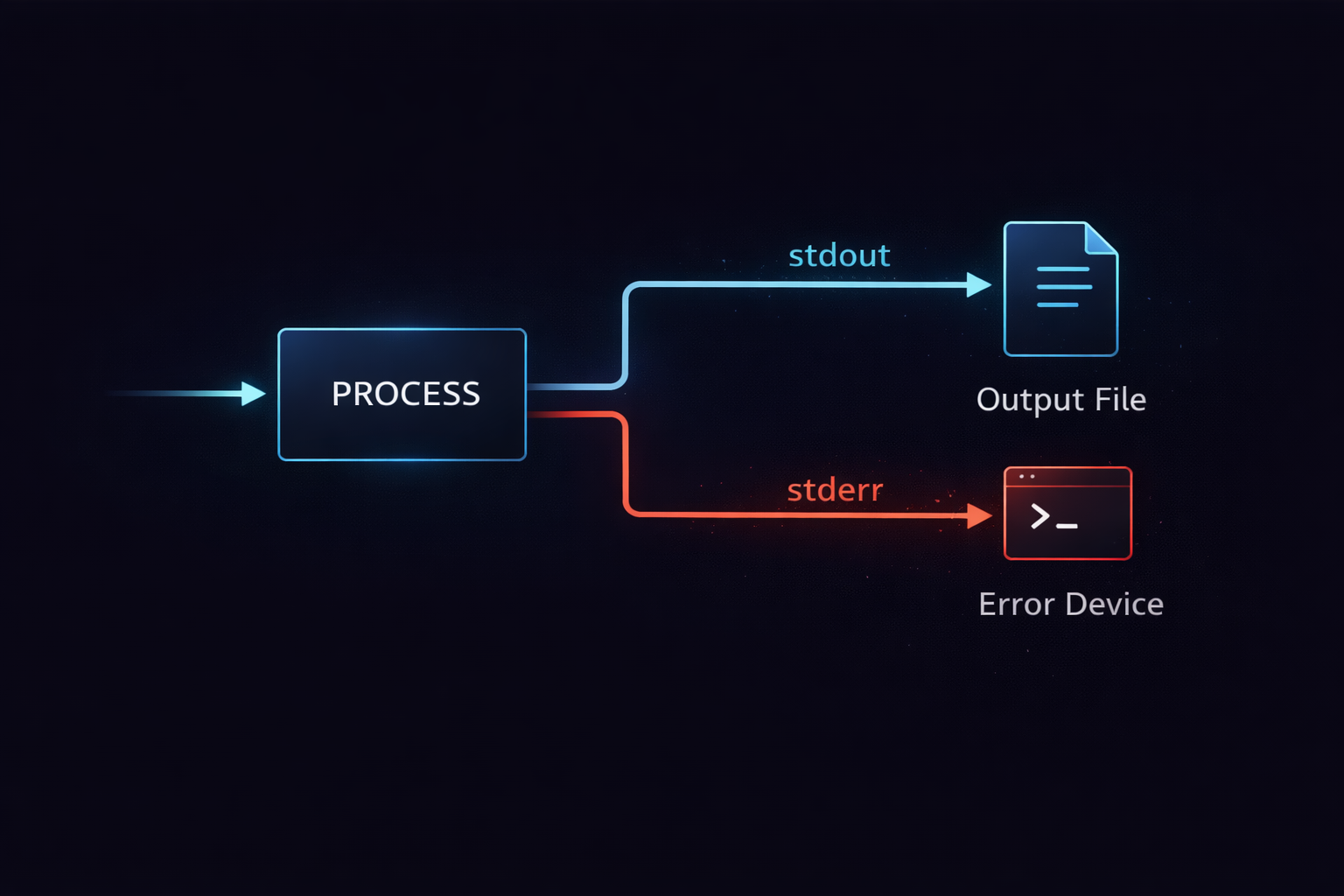
Once this structure is understood, the way we approach log-related problems changes fundamentally. Logs do not fail to appear because output is not generated, but because the output path is not properly connected. In other words, the problem lies not in the data, but in the path. With this perspective established, all subsequent concepts become naturally connected. The next step is to examine in detail why these output paths are separated, and what role each one plays.
stdout and stderr — If you don’t understand why output is split, logs will always be wrong
When logs are partially missing or error messages are not recorded in files, the cause is not a simple configuration issue. The root cause is that output is not a single stream, but two independent paths. Many developers assume that a program has only one output, but in Linux there are fundamentally two output streams. One path delivers normal results, and the other delivers errors or exceptions. These two paths do not interfere with each other and operate as completely separate flows. Without understanding this structure, it is impossible to explain why logs are split or appear to be missing.
stdout is the path used to deliver the normal execution results of a program. This stream is, by default, connected to the terminal and is intended to display results that users need to see. In contrast, stderr is a separate path used to deliver abnormal conditions such as errors or warnings. This stream operates completely independently from stdout. This separation is not an arbitrary design choice, but a structural decision to control data flow. If normal output and error output are mixed, post-processing and automation become difficult, which is why Linux was designed from the beginning to separate these into independent streams.
A key characteristic of this structure is that both streams exist simultaneously. When a program runs, stdout and stderr each send data through separate channels. Therefore, if only stdout is redirected to a file, stderr will still be printed to the terminal. This is the direct cause of the phenomenon where “only part of the log is recorded.” In other words, the logs did not disappear; they were output through a different path. This behavior is not an exception, but the fundamental operation of Linux I/O.
▶ To understand this concept more deeply: Understanding Linux I/O Streams — stdin, stdout, stderr, and Redirection
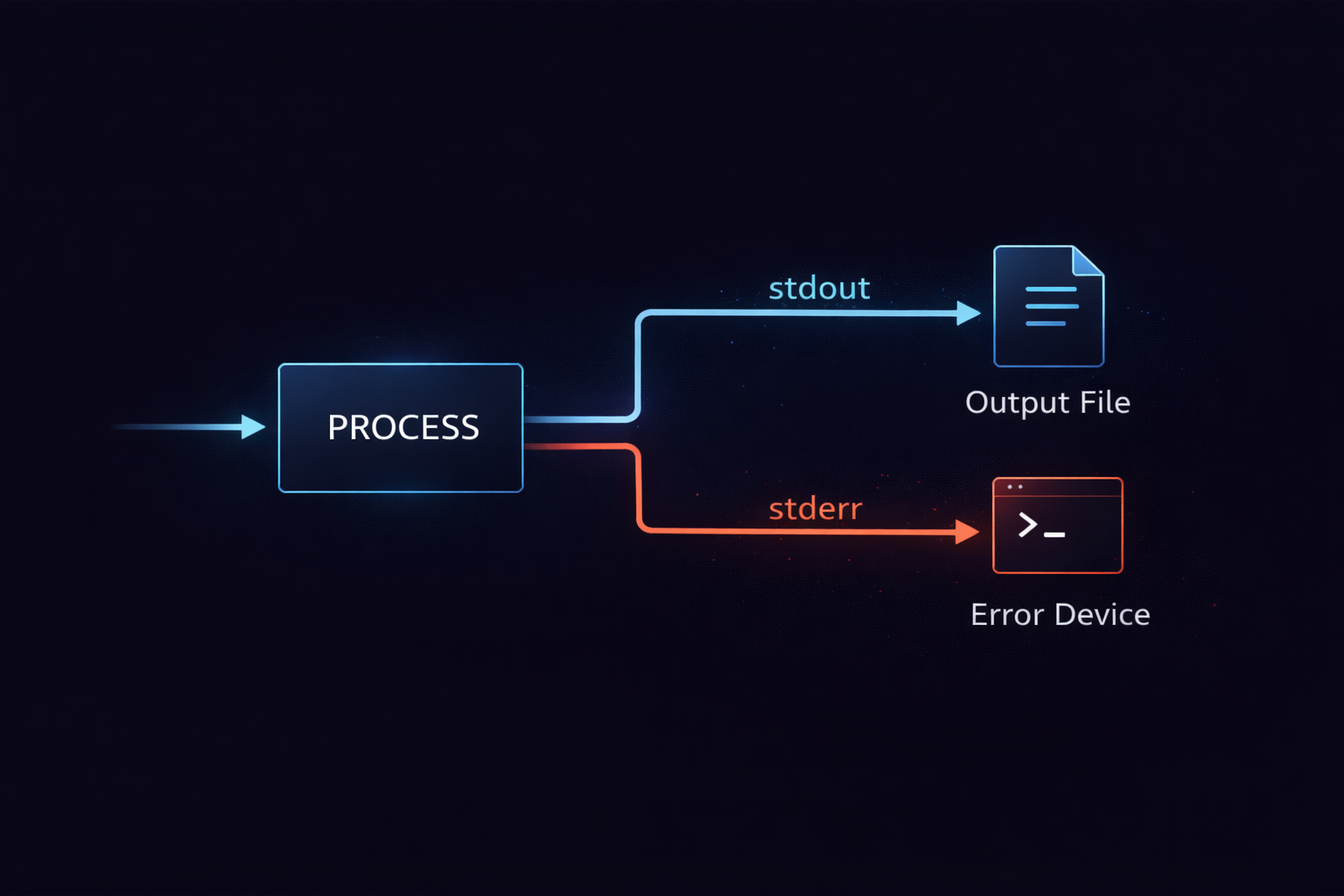
This leads to an important question. How are these two output paths controlled. Knowing that they exist is not sufficient. Each path must be directed to a desired destination, and in some cases merged or separated as needed. The mechanism that controls this behavior is redirection.
redirection — It does not change output, it changes the path
Redirection does not modify the output content. Redirection determines where the output will flow. Without understanding this distinction, it is impossible to explain why the same command produces different results. A program always outputs data to stdout and stderr in the same way. Redirection only changes the destination where that output arrives. In other words, the output itself remains unchanged, but the path it takes is altered.
For example, the > operator changes the destination of stdout to a file. This operator does not intercept or transform the program’s output, but replaces the target that stdout is connected to with a file. As a result, the program continues to write to stdout, but that data is delivered to a file instead of the terminal. Meanwhile, stderr is not affected at all. This is why, when only stdout is redirected to a file, stderr still appears in the terminal. This behavior occurs because redirection applies only to specific streams.
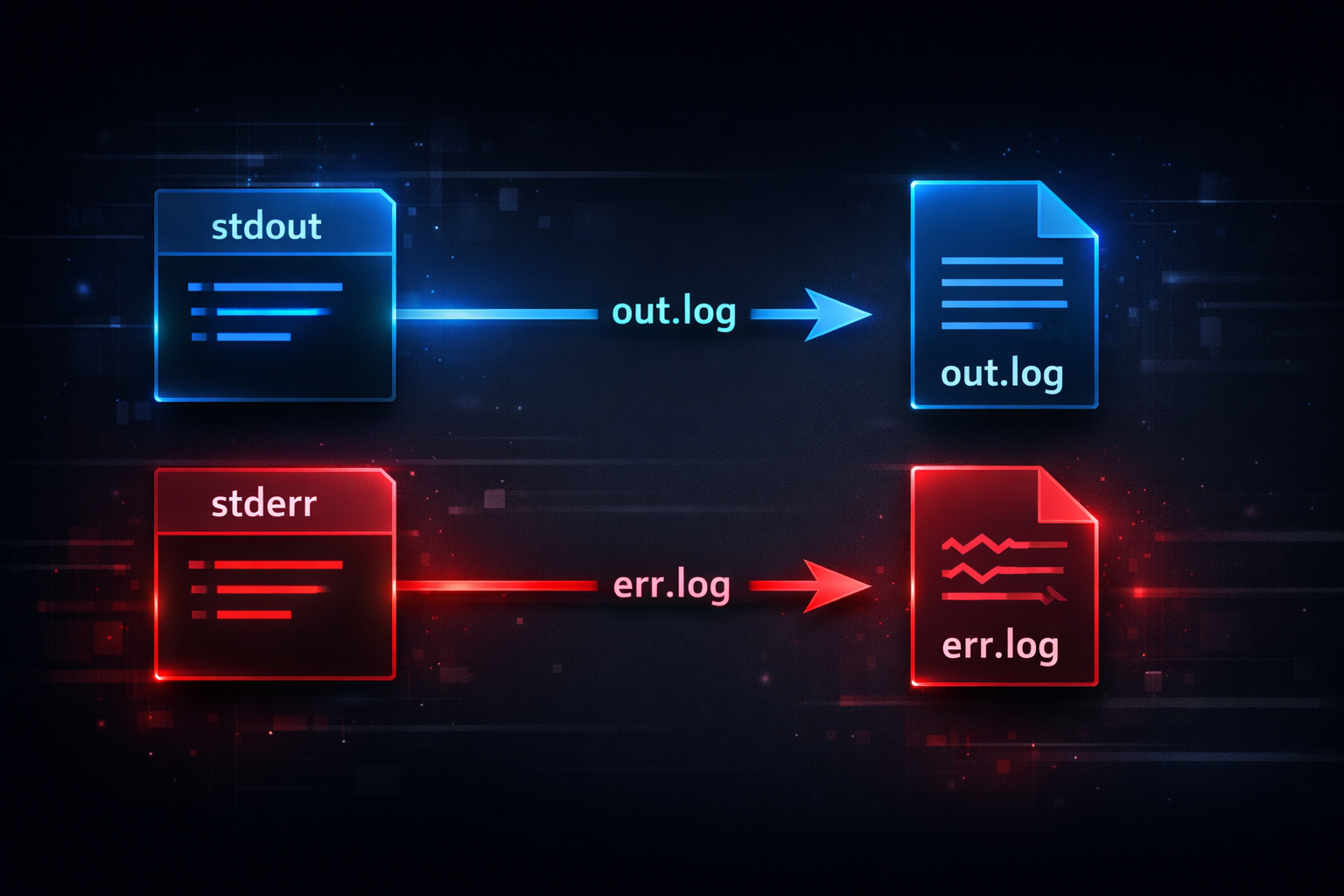
command > out.log 2> err.log
This command sends stdout and stderr to different files. The important point here is that the two streams are controlled independently. Each stream is connected to a different destination through separate redirection operations. Once this structure is understood, it becomes clear that separating or combining logs is not a matter of toggling an option, but a process of reconstructing stream paths.
Redirection becomes more powerful when used together with pipes. Pipes are responsible for connecting programs, while redirection controls where output is sent. These two mechanisms serve different purposes, but both operate on the same stream structure. Therefore, to fully understand redirection, it is necessary to understand how streams are identified and connected at a deeper level. This is where the concept of file descriptors emerges. Without understanding this structure, expressions like 2>&1 will always remain confusing.
2>&1 — It is not syntax, it is a connection between file descriptors
2>&1 is not merely syntax, but an expression that reconstructs the relationship between file descriptors. Without understanding this, it is impossible to explain why logs are merged or separated. Here, 1 represents stdout, and 2 represents stderr. These numbers are not arbitrary labels, but file descriptors that identify each stream. In Linux, all input and output operations are handled through file descriptors, which makes these numbers fundamental elements that determine actual data flow.
2>&1 means that stderr is connected to the same destination as stdout. The critical point is that this does not copy values, but links references. In other words, stderr follows whatever target stdout is pointing to. Because of this structure, the order of commands directly affects the result. For example, the following two commands produce different outcomes.
command > log.txt 2>&1
In this case, stdout is first redirected to a file, and then stderr follows stdout, so both streams are recorded in the file.
command 2>&1 > log.txt
In this case, stderr first follows the original stdout, and then only stdout is redirected to the file, so stderr continues to be printed to the terminal.
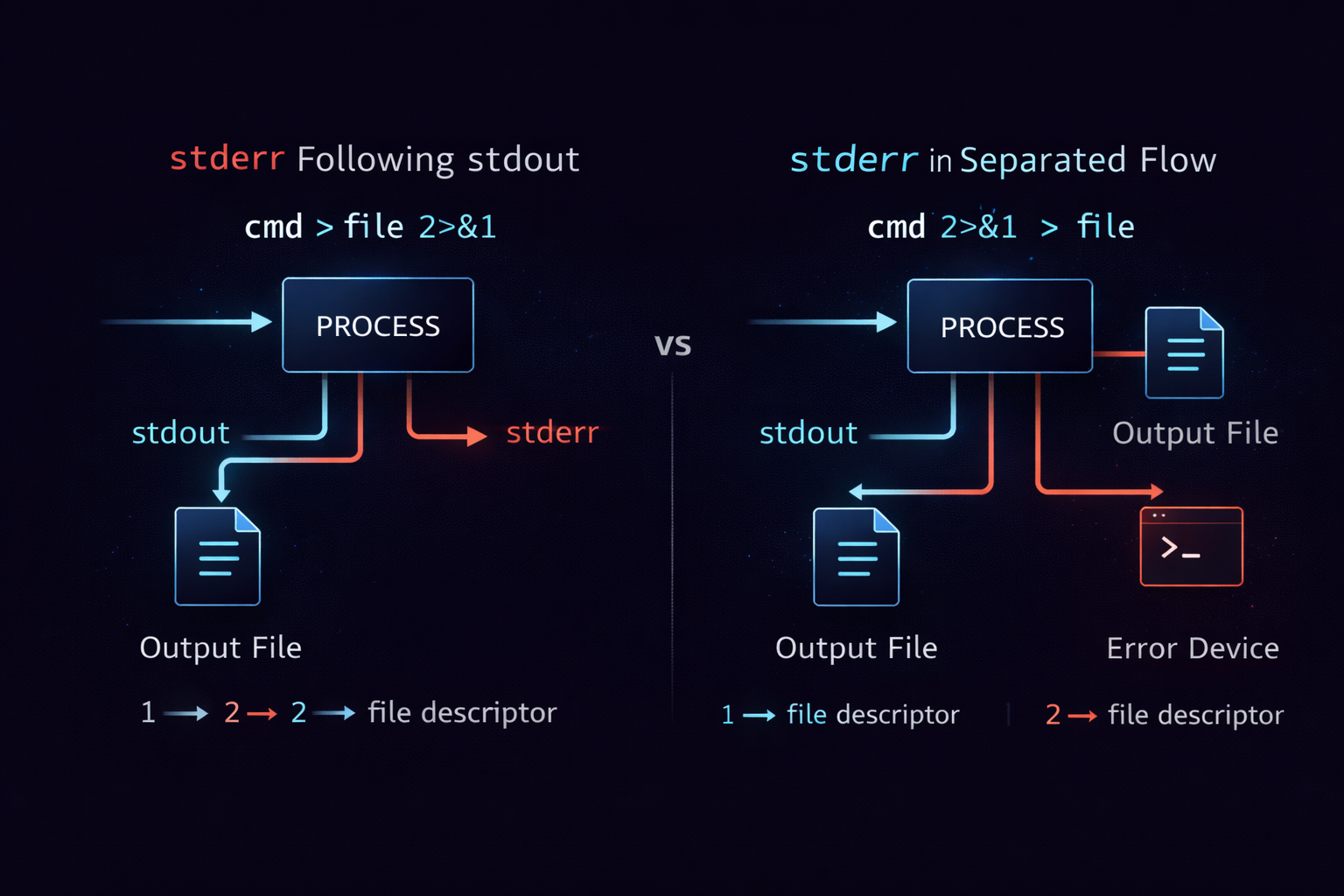
This difference is not a matter of syntax, but a matter of when and how file descriptors reference their targets. In other words, redirection is not about parsing strings, but about reconstructing file descriptors at execution time. Once this structure is understood, 2>&1 is no longer something to memorize, but something whose behavior can be predicted.
At this point, the flow becomes clear. Output is divided into two streams, redirection changes their paths, and file descriptors implement those connections. Understanding these three elements makes it possible to explain why logs appear to disappear. The next step is to analyze how this structure manifests as real problems in actual environments, and how these patterns repeat in practice.
Why pipe does not pass stderr — misunderstanding the connection structure always breaks logs
If error logs are not passed to the next command when using a pipe, this is not a configuration issue but a misunderstanding of the underlying structure. Many developers assume that the | operator forwards all output to the next process. However, in reality, a pipe connects only one stream. If this structure is not understood, situations repeatedly occur where data is passed but errors disappear. This problem is not caused by the tool itself but by a misunderstanding of how streams are structured.
A pipe connects only stdout to the stdin of the next process. At this point, stderr is not connected. This behavior is not a limitation but an intentional design decision. A pipe is a mechanism for connecting data flow. stderr exists as a separate channel for delivering errors, so it is not included in the data flow by default. Therefore, in a structure like command1 | command2, stdout from command1 is passed to command2, while stderr is still printed to the terminal. This behavior is not exceptional but the default.
The core of this structure is the independence of streams. stdout and stderr each have different file descriptors. A pipe operates only on file descriptor 1, which is stdout. Therefore, if stderr must also be passed, the two streams must be explicitly merged into one. This is where 2>&1 is used. In other words, stderr must first be connected to stdout, and then the pipe must be applied so that both outputs are passed together.
command1 2>&1 | command2
This command connects stderr to stdout and then passes the merged stream to command2. The order is important because the pipe operates only on stdout. If written as command1 | command2 2>&1, only the stderr of command2 is modified, while the stderr of command1 is still printed to the terminal. This difference is determined by which stdout the pipe connects at which moment.

This structure explains why logs do not pass through a pipe. The issue cannot be solved by simply adding redirection. The streams must first be merged, and only then connected. At this point, the next step is to examine how this output flow behaves differently in actual execution environments. In particular, this structure behaves very differently outside of a terminal.
Non-terminal environments — the real reason logs disappear is the execution context
When the same command prints logs normally in a terminal but fails to leave logs in background execution or service environments, the issue is not with redirection or stream configuration but with differences in execution context. A program always writes to stdout and stderr, but the result changes depending on what those streams are connected to. In other words, the problem lies not in the program but in the environment it is attached to.
A process executed in a terminal has stdout and stderr connected to the terminal device by default. In this case, output appears immediately on the screen. However, when running in the background using nohup or &, the process is detached from the terminal. In this state, stdout and stderr no longer point to the terminal. nohup by default redirects stdout to a file called nohup.out, and stderr follows stdout. Therefore, without explicit configuration, logs are written to an unexpected location.
nohup command &
This command sends stdout to nohup.out, and stderr is also recorded in the same file. However, this behavior can vary depending on the environment. In a systemd-based service environment, stdout and stderr are sent to journald. In Docker, stdout and stderr are collected as container logs. This means that even if the program is the same, the log destination changes completely depending on the execution environment.
▶ To understand this concept more deeply: Linux nohup Fully Explained — How to Keep Processes Running After Terminal Exit
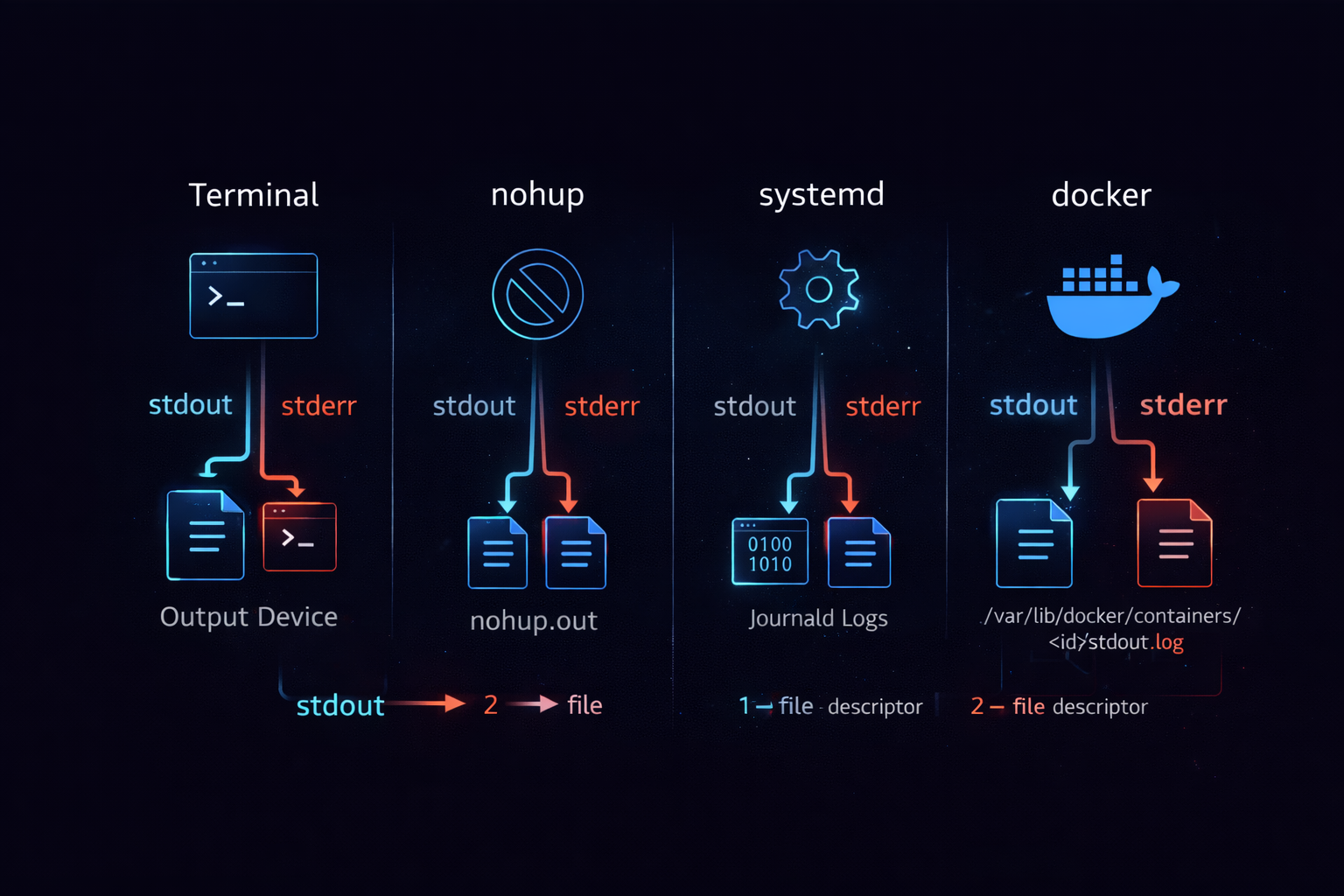
The core of this structure is that the output target is not fixed. stdout and stderr always exist, but their destinations are determined by the execution environment. Therefore, if logs are not visible, it does not mean there is no output, but that it is being sent somewhere else. To resolve this issue, the execution context must be examined instead of the program itself. The next step is to organize how to reliably capture logs in real environments based on this structure.
Controlling logs in practice — you must design the flow, not the output
Logging is not a matter of adding output commands. Logs are part of a data flow, and the result depends on how that flow is designed. stdout and stderr are independent channels, and their destinations change depending on the execution environment. Without understanding this structure, attempts to manage logs will repeatedly fail. Therefore, controlling logs requires designing the flow of streams, not the output itself.
In practice, explicitly controlling stdout and stderr is fundamental. The most common approach is to merge both streams into a single file. This is implemented using the form > file 2>&1. This structure sends stdout to a file and connects stderr to stdout so that both are written to the same file. This approach allows logs to be managed in a single file. However, since errors and normal output are not separated, analysis may become more difficult.
command > app.log 2>&1
Alternatively, stdout and stderr can be managed separately. In this case, each stream is redirected to a different file. This structure allows errors to be tracked independently. However, since logs are split across multiple files, management complexity increases. Therefore, the choice depends on system requirements. The important point is that regardless of the approach, the flow of streams must be intentionally designed.
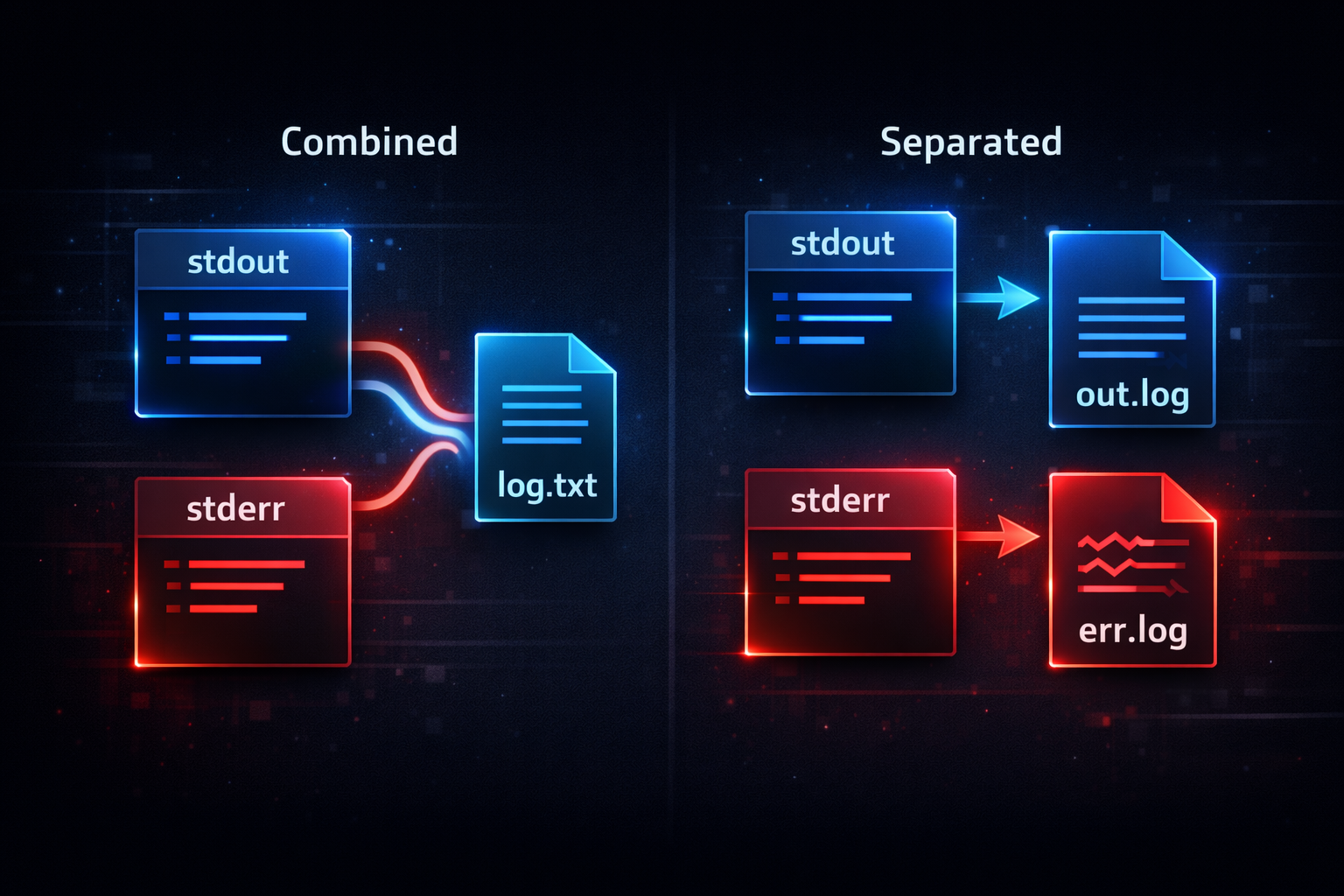
At this point, the structure becomes clear. Output is divided into two streams, a pipe connects only one, and the execution environment determines their destination. Understanding these three aspects makes it possible to explain why logs disappear. More importantly, it allows behavior to be predicted consistently even in new environments. The next step is to extend this understanding to a broader perspective of designing the entire logging system.
Logs Are Not Output, They Are a Contract — You Must Define a Structure That Is Interpreted Consistently Across the System
The reason logs are not being recorded is not a problem of output configuration. This problem is about how logging is defined across the entire system. In many environments, logs are treated as simple strings printed to the console. However, in a real system, logging is an interface. If this interface is not defined, even if stdout and stderr are fully understood, logs will still be recorded inconsistently. Therefore, solving logging issues requires defining the meaning of output at the system level, not just the output method.
stdout and stderr are not merely output channels. These two streams are interfaces designed to carry different meanings. stdout is the path for delivering normal data flow. stderr is the path for delivering errors or exceptional conditions. When this distinction is maintained, all subsequent processing operates in a stable manner. When this distinction collapses, logs are no longer interpretable data. For example, if all logs are written to stdout, errors cannot be separated. Conversely, if all logs are written to stderr, even normal data is treated as an error. This problem is not about output mechanics, but about a failure in semantic design.
This structure operates internally based on file descriptors. A process sends data to stdout through fd 1. A process sends data to stderr through fd 2. The operating system handles these two streams separately. However, the operating system does not interpret the meaning of this data. The operating system only transports data. Therefore, the meaning of stdout and stderr must be defined by the application. At this point, logging becomes not just output, but a contract between systems.
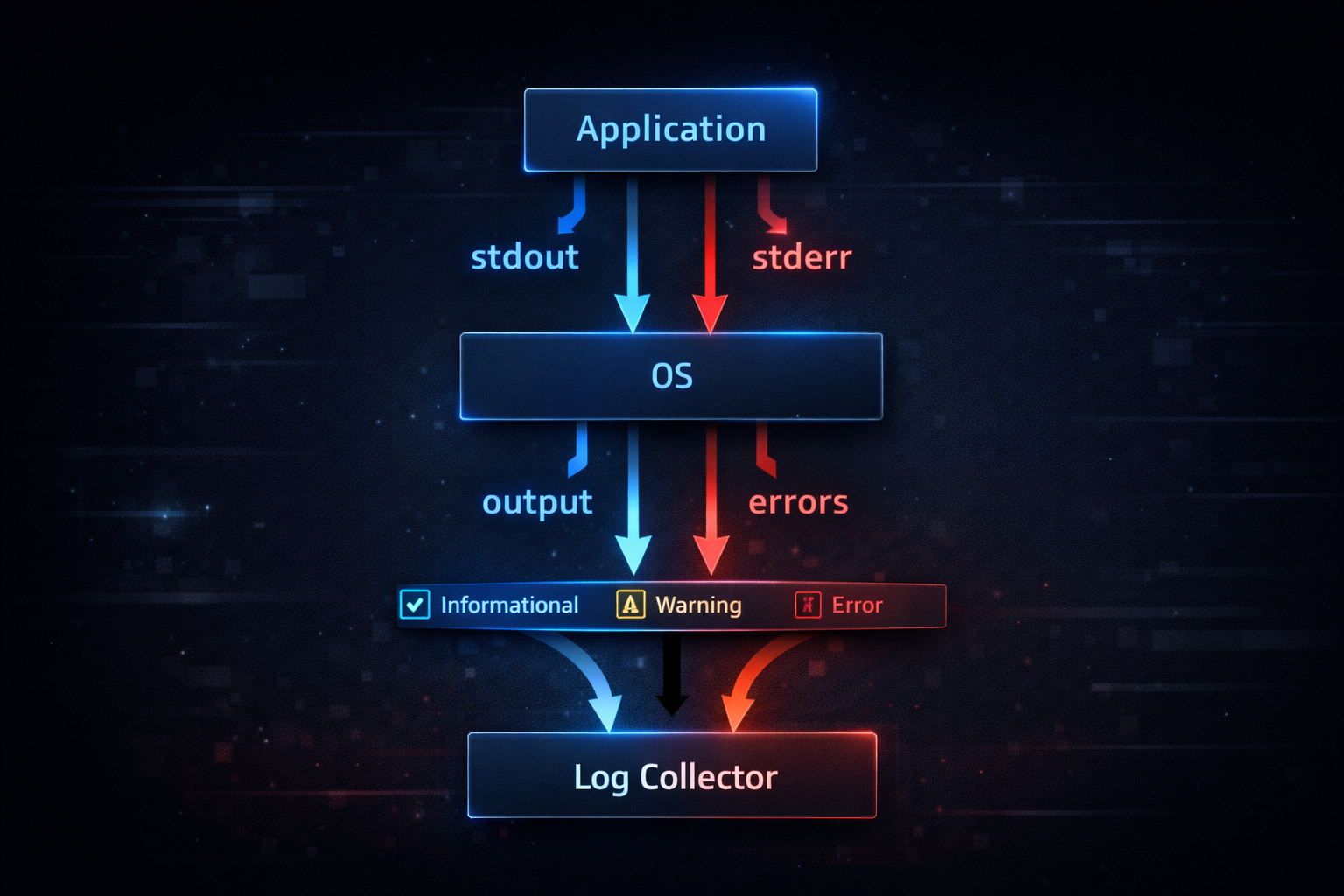
The reason this structure is critical in practice is that logs are not just recorded, but reused by other systems. Docker collects stdout and stderr as they are. systemd forwards both streams to journald. Log collection systems perform analysis based on this data. If the meaning of stdout and stderr is not clearly defined, the analysis results become distorted. In other words, logs are not merely recorded data, but input data that downstream systems interpret.
Ultimately, logging issues are not about output, but about structure. stdout and stderr are not physical output paths, but interfaces with defined meaning. The quality of logs is determined by how these interfaces are defined. Therefore, when designing logging, the first question is not “where should the output go,” but “what meaning should the output carry.” Once this criterion is clearly defined, logs remain consistent even when redirection, pipes, or execution environments change. At this point, logging is no longer output, but expands into a data flow between systems.
