
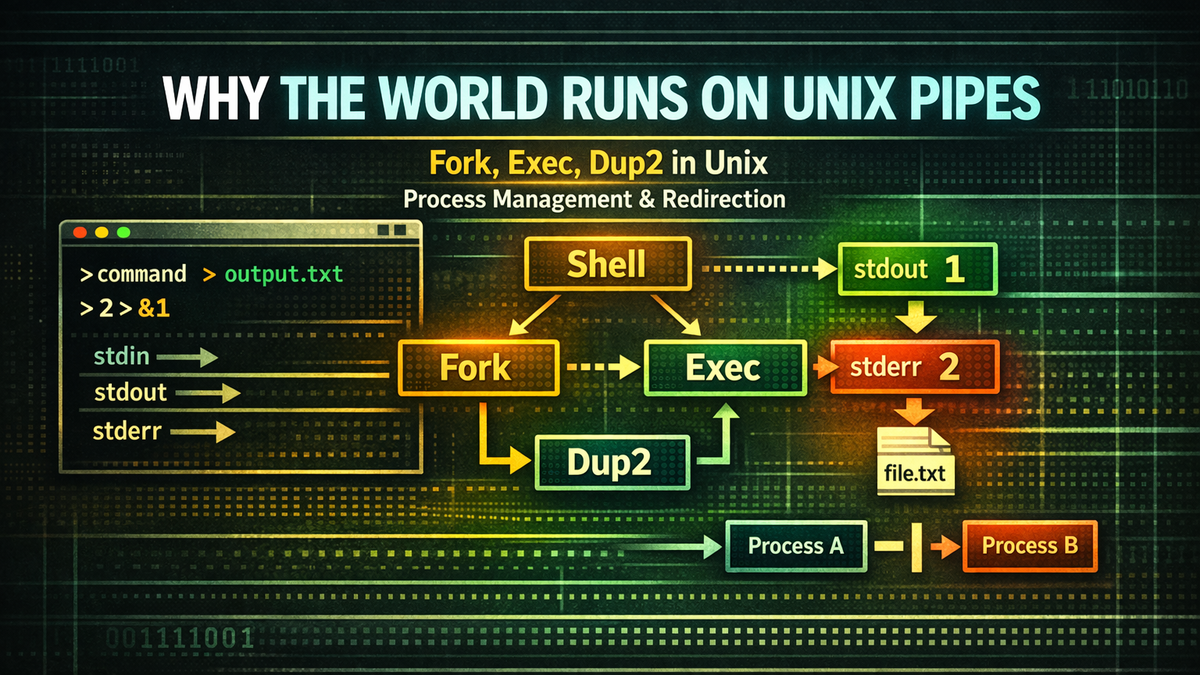
What Happens Behind the Single Line We Type
When we enter a command in the terminal and press Enter, a program runs. This process feels so natural that most developers rarely think about what is happening behind the scenes. It appears to be a simple interface where you type a string and get a result. However, if you take a closer look at what the shell actually does, you will find that a fairly sophisticated structure lies beneath this simplicity. The single line of command we casually type is, in fact, a small execution pipeline that sequentially invokes multiple operating system–level mechanisms.
Consider the following command:
grep ERROR log.txt > result.txtThis command searches for the string ERROR in a log file and saves the result to another file. We intuitively understand what this means. The grep program runs, and its output is written to a file instead of the terminal. But if we examine how the shell actually executes this command, the story becomes slightly different. The grep program is not originally designed to write directly to a file. It simply writes data to stdout. Before executing the program, the shell sets up where that output will go, which is why the result ends up being written to a file.
Now consider a slightly more complex example:
command > output.log 2>&1This line merges standard output and error output into the same file. Many developers are familiar with this syntax, but fewer understand what actually happens inside the system when it runs. On the surface, it looks like simple shell syntax, but in reality, it is deeply connected to one of Unix’s core concepts: file descriptors. The shell reconfigures the file descriptor connections before executing the program, and only then does it run it. The program itself has no awareness of where its output is going—it simply writes data.
At this point, a natural question arises. What kind of preparation does the shell perform before executing a program? If executing a program were that simple, it might seem like the operating system could handle it directly. So why does the shell exist as an intermediate program?
Following this question leads us to one of the most fundamental structures of the Unix system: the process model. At the center of this model are two key system calls: fork and exec.
Now let’s take a closer look at what the shell actually does when executing a command. The single line we type into the terminal is not just a string—it is a task that the shell must interpret and execute. And to perform that task, the shell must first create a new process.
The Shell Is Not Just a Command Executor
Many people think of the shell as simply a program that executes commands. You type a command in the terminal, the shell reads it, and then runs the corresponding program—that is the common understanding. However, the role of the shell is far more complex than it appears. The shell interprets the string entered by the user, prepares the entire environment required to execute that command, and then runs the program in an appropriate way. In that sense, it is closer to a process manager than a simple command executor.
For example, suppose a user enters the following command:
ls -lOn the surface, it looks straightforward. It is a command to display a detailed list of files in a directory. But the shell does not simply pass this command directly to the operating system. First, it analyzes the string to determine which program should be executed, separates the arguments, checks environment variables, and prepares additional structures such as redirection or pipes if necessary. Only after all of this does it proceed to actually execute the program. In other words, the shell does not merely invoke a program—it constructs the entire execution environment in which that program will run.
An important aspect of this process is that the shell does not execute the program within itself. If it did, the shell would be unable to perform any other tasks until the program finished. More importantly, it would become difficult to configure input/output structures in advance or to build pipelines. For this reason, Unix uses a distinctive approach to executing programs. It first creates a new process and then runs the program within that process.
This structure gives the shell a great deal of flexibility in how it executes programs. Before a program runs, the shell can create a new process and freely configure its input/output structure. Redirecting standard output to a file, connecting pipes, or sending error output elsewhere—all of these operations are completed before the program actually starts. By the time the program begins execution, the entire I/O structure is already in place.
Thanks to this design, the Unix shell becomes a highly powerful interface. Users can connect programs using simple syntax, and the shell interprets that syntax to construct the actual process structure. The pipe and redirection syntax we use every day are, in fact, compact representations of the complex operations performed internally by the shell.
At this point, a natural question arises. How does the shell create a new process? And how is a program executed within that process? The answer to these questions begins with one of Unix’s fundamental system calls: fork.
fork: Unix’s Unique Way of Duplicating Processes
The way Unix executes a new program is quite distinctive compared to other operating systems. In many systems, running a new program involves a dedicated system call that creates an entirely new process. Unix, however, takes a different approach. Before executing a new program, it first duplicates the current process. The system call that performs this operation is fork.
fork creates a near-identical copy of the currently running process. When this call is executed, a child process is created that closely mirrors the parent process. Both processes begin execution in almost the same state. The child inherits the parent’s memory contents and file descriptor state, but they remain separate processes. In modern systems, this duplication is typically implemented efficiently using copy-on-write. Of course, they are not completely identical. Their process IDs are different, and the return value of the fork call differs between the parent and the child. Still, their basic execution environments are nearly the same.
If we simplify this behavior, it looks like this:
shell
  └─ fork()
      └─ child process
The shell calls fork to create a child process that is almost identical to itself. From that point on, the parent and child processes execute independently. The parent process remains as the shell, continuing to handle user input, while the child process prepares to run the program that will be executed next.
At first glance, this structure may seem somewhat inefficient. It raises the question: why duplicate a process before executing a program? However, this design has a crucial advantage. It allows the environment of the child process to be freely modified before the program is executed.
For example, if the shell wants to redirect a program’s output to a file, it can first modify the file descriptors in the child process and then execute the program. The same applies when constructing pipelines. The shell can create multiple child processes and connect their inputs and outputs to form a data flow. The program itself does not need to be aware of any of this. It simply reads from standard input and writes to standard output.
However, fork alone is not enough to run a program. It only duplicates the process, and the duplicated process is still executing the shell’s code. To run a different program, the contents of the child process must be replaced entirely. This is where the second key system call in the Unix process model comes into play: exec.
exec: The Moment a Process Becomes a Program
As we saw earlier, the shell first calls fork to create a new process when executing a command. The child process created at this point starts in a state almost identical to the parent. It has a similar memory structure, the same open file descriptors, and is running the same code. In other words, the child process is still effectively part of the shell program. But what we actually want is not another shell—we want to run a real program such as ls or grep. This is where Unix uses another key system call: exec.
exec does not create a new process. In fact, it does the opposite. Instead of creating a process, it replaces the current process’s address space with a new program. The process ID remains the same, but the running code and memory structure are rebuilt according to the new program. In other words, the existing process’s memory is cleared and filled with the code and data of the new program. Once this process is complete, the process is no longer part of the shell—it becomes a completely different program. The process ID stays the same, but everything else is transformed.
If we express this flow structurally, it looks like this:
shell
  └─ fork()
      └─ child process
            └─ exec(ls)
The shell first calls fork to create a child process. Then, within that child process, it calls exec to replace the running program with ls. From that moment on, the child process becomes the ls program and starts printing the directory listing. The parent process remains as the shell, continuing to wait for user input, while the child process runs independently. This structure allows the shell to maintain both program execution and the user interface at the same time.
The reason this approach is important is that it allows the shell to freely modify the child process’s environment before the program is executed. Since exec replaces the program code at the moment it is called, the shell can adjust the input/output structure or reconfigure file descriptors beforehand. In other words, just before the program starts, the shell can fully define the execution environment it will run in. Features like redirection and pipes are implemented at precisely this stage.
One important point to remember is that the program itself has no awareness of being redirected. It simply reads from standard input and writes to standard output. Whether that data goes to the terminal, is saved to a file, or is passed to another program is determined not by the program, but by the shell. And that decision is made just before exec is invoked.
At this point, a natural question arises. What exactly does the shell modify before executing the program? How is the program’s input/output structure configured? To answer this, we first need to understand one of the most fundamental concepts in Unix process I/O: file descriptors.
The Core of the Unix I/O Model: File Descriptors
In Unix, all input and output is handled through an abstract structure called file descriptors. A file descriptor is a small integer managed by the operating system, acting as a handle that refers to files, devices, pipes, sockets, and more that a process has opened. Programs do not directly interact with the internal structure of files or devices. Instead, they perform I/O by reading from and writing to these numbered file descriptors.
Every Unix process starts with three file descriptors by default. These correspond to standard input, standard output, and standard error, and they are fixed as 0, 1, and 2 respectively. When a program reads from standard input, it is actually reading from file descriptor 0. When it writes to standard output, it writes to file descriptor 1. Similarly, standard error output is written through file descriptor 2.
By default, these descriptors are connected to the terminal. That is why, when we run a program, its output appears on the screen. The program is simply writing data to stdout, but because stdout is connected to the terminal, the result is displayed. Thanks to this structure, the program does not need to know where its output is going. From the program’s perspective, it only needs to write data to stdout.
For example, consider the following code:
write(1, "hello\n", 6);This code writes the string to file descriptor 1, which is standard output. If stdout is connected to the terminal, the string appears on the screen. If stdout is connected to a file, the same code writes to that file. If it is connected to a pipe, the data is passed to another program. The program’s code does not change at all, yet the destination of its output can vary completely.
This is the most important characteristic of the Unix I/O model. A program simply reads from and writes to file descriptors, while the actual connections of those descriptors are determined externally. In other words, a program’s I/O structure is defined not by the program itself, but by its execution environment. And the component responsible for constructing that environment is the shell.
Before executing a program, the shell can modify the connections of file descriptors. It can redirect standard output to a file, connect it to the input of another process, or separate error output into a different file. These adjustments are made before the program starts, and the program simply operates within the configured environment.
At this point, the meaning of redirection syntax becomes clearer. Symbols like >, <, and 2> do not merely specify output locations—they actually reconfigure the connections of file descriptors. And this reconfiguration takes place in the child process just before the program is executed.
So how does the shell change these file descriptor connections? The answer lies in one of Unix’s system calls: dup2.
The True Meaning of Redirection: Rewiring File Descriptors
When people first learn shell redirection syntax, most understand it as a simple convenience feature. For example, a command like ls > file.txt appears to merely send output to a file. From the user’s perspective, there is little reason to think beyond that. However, if we look at how this command is executed internally, the situation becomes far more interesting. Redirection is not just about changing where output goes—it is about reconfiguring file descriptor connections.
Consider the following command:
ls > file.txtWhen this command is executed, the output of the ls program is written to a file called file.txt instead of the terminal. However, the ls program itself has no awareness of this change. It continues to write data to stdout as usual. The only difference is that stdout is now connected to a file rather than the terminal, so the data ends up being written to the file. In other words, redirection does not change the program—it changes the I/O structure outside the program.
When executing this command, the shell performs the following steps. First, it opens the file file.txt and obtains a new file descriptor. Then it connects file descriptor 1 (which corresponds to stdout) to this file descriptor. As a result, when the program writes data to stdout, that data is directed to the file instead of the terminal. Finally, the shell calls exec to run the actual program.
Structurally, this can be represented as:
stdout (fd 1)
   ↓
file.txt
In other words, the target of stdout is changed from the terminal to a file. Once the program runs in this state, it writes to stdout just as it always does, but the actual data is stored in the file. From the program’s perspective, nothing has changed. However, because the execution environment has been altered, the result is completely different.
This approach is important because it allows a complete separation between programs and their I/O structure. Programs are only responsible for reading and writing data, while the shell defines how that data flows. This is why we can combine very simple programs to build complex data processing pipelines. Redirection and pipes are features built on top of this philosophy.
However, there is still one important piece missing. How are file descriptor connections actually changed? What system call does the shell use to redirect stdout or stderr? The answer to this question appears in the next section: the system call dup2.
dup2: The Final Piece That Completes Shell Redirection
As discussed earlier, the essence of shell redirection is the reconfiguration of file descriptor connections. Where a program sends its output is determined not by the program’s code, but by how file descriptors are connected. The shell modifies this structure before executing a program to create the desired data flow. This raises an important question: how does the shell actually change these file descriptor connections? While it may seem like simply changing a variable, it in fact requires a system call at the operating system level. That role is performed by dup2.
dup2 is a system call that duplicates file descriptors. More precisely, it makes one file descriptor refer to the same underlying object as another. For example, suppose a file is opened with a descriptor called fd. If you call dup2(fd, 1), file descriptor 1 (which is stdout) will now point to the same file as fd. As a result, when the program writes to stdout, the data is actually written to the file referenced by fd. If stdout was previously connected to the terminal, that connection is replaced, and the file becomes the new destination.
This behavior explains the core mechanism behind shell redirection. Consider the following command:
ls > file.txtBefore executing this command, the shell opens file.txt and obtains a new file descriptor. It then uses dup2 to connect stdout to that file descriptor. After this setup, when exec is called, the program runs within the modified I/O environment. The ls program simply writes to stdout, but the data is directed to file.txt instead of the terminal.
Now consider a more complex example:
command > file 2>&1This command redirects both standard output and standard error to the same file. The shell first connects stdout to file. Then it connects stderr to the same destination as stdout. The important detail here is that 2>&1 is better understood not as an abstract “merge stderr into stdout,” but as copying the current target of file descriptor 1 into file descriptor 2. Internally, this is equivalent to:
dup2(1, 2)This call makes stderr point to the same destination as stdout. As a result, both normal output and error messages are written to the same file. The key point is that this configuration happens before the program is executed. The program itself simply writes to stdout and stderr, without any awareness of where the data is actually going.
An interesting detail emerges here: the order of shell redirection can change the result. For example, the following two commands may look similar, but they behave differently:
command > file 2>&1
command 2>&1 > file
In the first command, stdout is redirected to the file first, and then stderr is connected to stdout, resulting in both outputs going to the file. In the second command, stderr is first connected to the current stdout (which still points to the terminal), and then stdout is redirected to the file. As a result, error messages still appear on the terminal. This difference highlights that redirection is not just syntax—it is actual manipulation of file descriptors.
At this point, the way the shell manipulates file descriptors becomes clearer. It creates a new process with fork, reconfigures file descriptors using dup2 before calling exec, and then runs the program. However, the shell’s work does not end here. Pipes are also constructed using the same principles as redirection—and pipes are one of the features that best illustrate the Unix philosophy.
How Pipelines Are Constructed
One of the most iconic features of the Unix shell is the pipe. We often use commands like:
ls | grep txtThis command sends the output of ls as input to the grep program. On the surface, it looks like a simple connection, but in reality it involves two independent processes running simultaneously and exchanging data as a stream. ls outputs a directory listing, and grep reads that data and filters only the lines containing a specific string. The two programs are completely unaware of each other’s existence, yet they are seamlessly connected through the pipe.
To build this structure, the shell first creates a pipe using the pipe() system call. pipe() returns two file descriptors: one for reading and one for writing. Data written to the write end by one process can be read in order from the read end by another process. These descriptors can be used like files, but they are actually connected to a buffer inside the kernel. When one process writes data into the pipe, another process can read that data.
In the next step, the shell creates two child processes. The first process runs the ls program, and the second runs the grep program. However, before calling exec, the shell must reconfigure file descriptors in each process. In the ls process, stdout is connected to the write end of the pipe. In the grep process, stdin is connected to the read end of the pipe. This reconfiguration is also performed using dup2.
Structurally, the resulting data flow looks like this:
ls stdout → pipe → grep stdinWhen both programs run in this state, ls outputs the directory listing, and that data flows through the pipe into grep. grep reads the data, filters it, and outputs the result. The two programs do not know about each other, yet they form a single data-processing pipeline through their file descriptors.
This structure clearly illustrates the Unix philosophy. Programs are small and focused. ls simply lists files, and grep only performs string matching. But by connecting them with pipes, the shell enables complex data processing tasks. In other words, the structure that connects programs becomes more important than the programs themselves.
At this point, it becomes clearer what the shell is actually doing. The shell is not just a tool for executing programs—it creates processes, reconfigures file descriptors, and designs the flow of data. The short command we type is, in fact, a blueprint for a small network of processes constructed internally by the shell.
The Shell Is a Small Process Orchestrator
When we bring together system calls like fork, exec, dup2, and pipe, the role of the shell becomes much clearer. The shell is not just a simple command interpreter. It is a kind of process orchestrator that creates processes, designs input/output structures, and connects programs together. The single line we type into the terminal is essentially a small execution plan given to the shell.
Consider the following command:
cat log.txt | grep ERROR | sort > result.txtThis line represents a pipeline connecting three programs. To execute it, the shell creates multiple pipes, spawns three child processes, and properly connects the file descriptors of each process. The stdout of the first process is connected to the stdin of the second, and the stdout of the second is connected to the stdin of the third. The stdout of the final process is redirected to a file. All of this is configured by the shell before the programs begin execution.
From a broader perspective, the shell is constructing a small data processing system. Each program acts like an independent node, and pipes serve as data streams connecting those nodes. The shell builds this network of nodes and connections, and then execution begins. Once the programs start running, data flows through the pipes, and each program performs only its designated role.
What is remarkable is how simple yet powerful this structure is. Each program does not need to implement complex functionality. It only needs to read from standard input and write to standard output. Because the shell connects these programs, small tools can be combined to perform complex tasks. This is exactly the idea often described in the Unix philosophy as the “composition of small programs.”
Another interesting point is how long this structure has endured. System calls like fork, exec, pipe, and dup2 already existed in Unix in the 1970s. Yet this model is still used in modern operating systems today. Even the way Docker collects logs—based on stdout and stderr—follows the same principle. Systems like Kubernetes and CI platforms also process logs based on program output streams.
In other words, much of the modern infrastructure we use today still operates on top of the Unix I/O model. The execution model created by the shell, a relatively small program, has remained intact for decades. And in the next article, we will move on to another key concept of this model: why Unix treats everything as a file, and what design philosophy led to that idea.
The Unix Execution Model That Has Remained Unchanged for 50 Years
So far, we have followed step by step what happens when the shell executes a command. A single line typed into the terminal is not just a simple instruction—it is a small execution plan that the shell must interpret and carry out. The shell first calls fork to create a new process, then uses exec to turn that process into the actual program. In between, it uses dup2 to reconfigure file descriptors and, when needed, uses pipe to connect multiple programs into a single data flow. The syntax we use every day—>, |, 2>&1—is simply a concise representation of these underlying system calls working together.
What is remarkable is that this execution model was already established in Unix in the early 1970s. System calls such as fork, exec, pipe, and dup2 existed in the original Unix kernel and have remained largely unchanged for decades. While many operating system architectures have evolved significantly over time, the Unix process execution model has remained surprisingly stable. The reason is that this model is both simple and powerful. Programs only need to read from standard input and write to standard output, while the shell constructs the data flow. This clear separation allows programs to focus on small, specific tasks, while users can freely compose them through the shell.
This structure is not merely a relic of the past—it continues to play a critical role in modern software systems. Consider the logging system of Docker containers. Most container platforms collect application logs not from files, but from stdout and stderr streams. Programs running inside a container simply write logs to standard output, while the container runtime captures that output and forwards it to a logging system. This structure closely mirrors the Unix standard output model: programs write to streams, and the execution environment collects and processes those streams.
A similar approach is used in container orchestration systems like Kubernetes. Applications running inside a Pod write logs to standard output, and Kubernetes collects that output and sends it to a logging backend. The same pattern appears in CI/CD pipelines as well. Programs executed during the build process output results to stdout, and the pipeline system reads that output and stores it as logs or artifacts. In other words, much of what we call modern infrastructure still revolves around the two streams: stdout and stderr.
This demonstrates how enduring the Unix design has been. The model of creating processes with fork, executing programs with exec, modifying I/O structures with dup2, and connecting processes with pipe is not just an implementation detail—it reflects a broader philosophy. Programs should be small and simple, operate independently, and exchange data through streams. The shell, in turn, serves as the interface that connects these programs into larger systems.
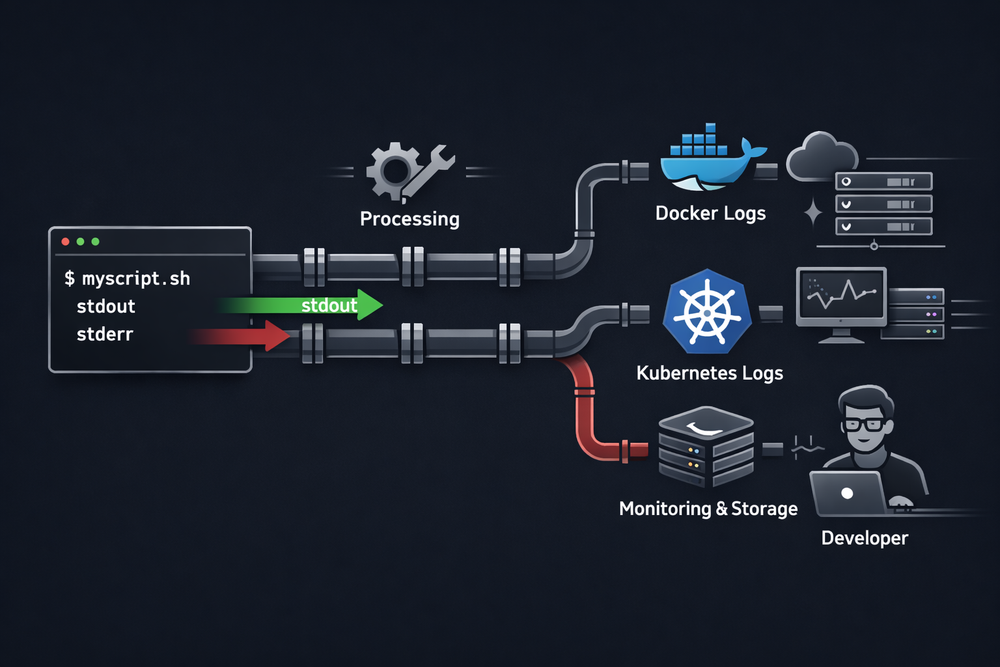
The single line we type into the terminal is not just a command—it is closer to a declaration that constructs a small system. The shell interprets that declaration, creates processes, designs the input/output structure, and connects programs together. Once the programs begin execution, data flows through pipes and streams, and a task is completed. This model is extremely simple, yet remarkably flexible. That is why, even decades later, many systems still operate on the same structure.
In the next article, we will explore another key concept of this model. So far, we have seen how program I/O is connected through file descriptors and streams. But Unix goes one step further by treating devices, pipes, and even networks as if they were all files. This design is summarized in one of Unix’s most famous philosophies: “Everything is a file.” In the next post, we will take a deeper look at how this idea emerged and why it became a fundamental design principle that runs through the entire Unix system.
