
1. Definition / Conclusion
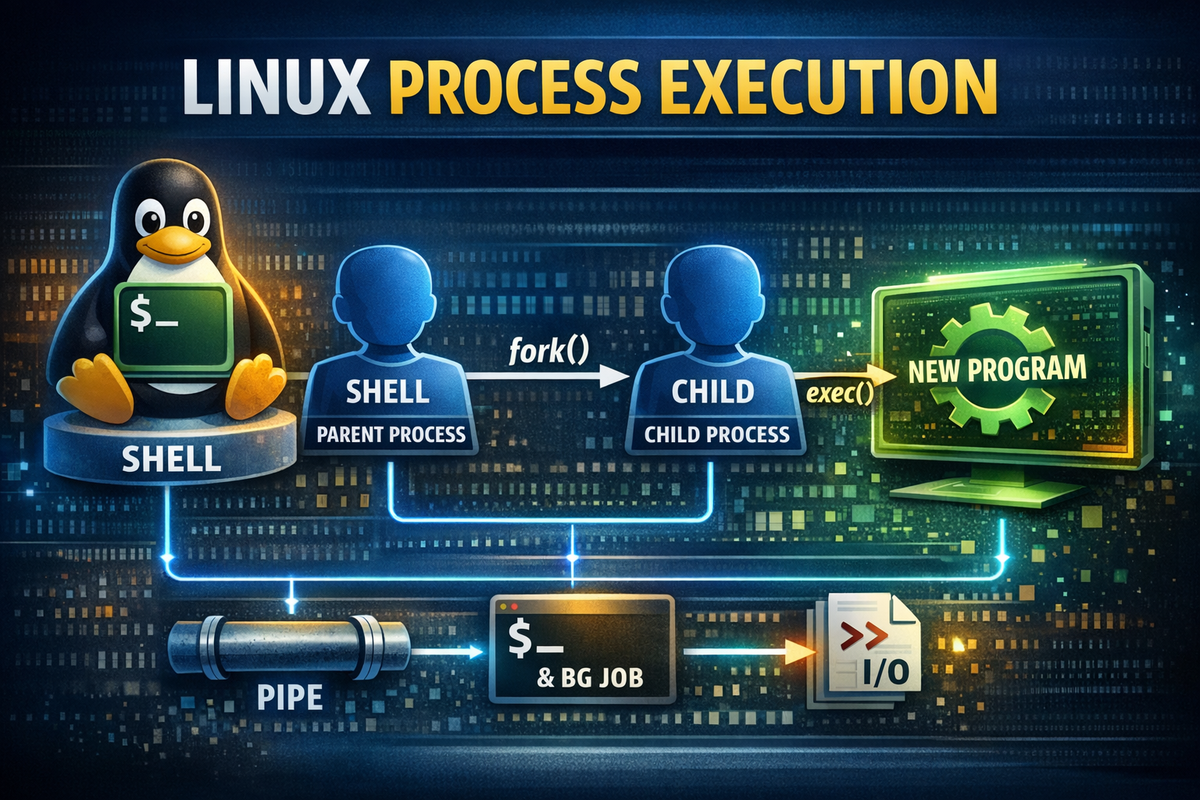
fork and exec are core mechanisms that must be understood in order to grasp how programs are executed in Linux and Unix-like systems. Many people simply think, “the shell executes the command” when they type something into the terminal, but the actual internal behavior is more structured than that. The shell usually does not execute a command directly within itself. Instead, it first uses fork to duplicate the current process and create a child process, and then within that child process, it calls exec to replace the execution target with the desired program.
This point is critical. The shell is not so much an entity that “executes commands directly,” but rather a coordinator that prepares the environment in which execution can occur and delegates the execution. Every time a user enters commands like ls, grep, sleep, or python, the shell internally creates a new process and transfers execution authority to that process. As a result, even after the command finishes, the shell remains alive, and the user receives the prompt again.
Ultimately, there is one key idea. Program execution is not a simple invocation, but a combination of process creation and process replacement. fork duplicates the execution environment, exec transforms that duplicated environment into a new program, and together they form the fundamental execution model of the shell. Without this perspective, concepts like pipes, redirection, background execution, job control, subshells, and daemonization appear as disconnected syntax. With it, however, the shell is no longer seen as a collection of commands, but as a process control system.
2. Core Summary
First, fork is a system call that duplicates the currently running process. More precisely, it creates a new child process based on the execution context of the parent process. At this point, the child starts from almost the same code path as the parent, but it has a different PID and receives a different return value. The parent receives the child’s PID, while the child receives 0. This allows the same code to branch into different behaviors for parent and child.
In contrast, exec does not create a new process. It is a family of system calls that replaces the program image of the current process with another program. There are multiple variants such as execve, execl, and execvp, but the essence is the same. The current process’s code, data, and stack are discarded, and a new program is loaded in their place. The PID remains the same, but what the process actually does becomes completely different.
Therefore, the typical flow when a shell executes a regular command looks like this:
User input
   ↓
Shell parses the command
   ↓
fork() is called → child process is created
   ↓
exec() is called in the child process
   ↓
Actual program execution
   ↓
Parent shell waits with wait() or immediately returns the prompt
The important point here is that the notion of “execution” must not be treated as a single step. Internally, the system separates it into two distinct stages:
fork→ creates the process that will act as the execution subjectexec→ determines what that process will execute
In other words, the key distinction is that this is not about “running a command,” but about a process creation + execution replacement structure. Understanding this explains naturally why the shell does not terminate, why exec ls behaves differently from a normal ls, why sleep 10 & immediately returns the prompt, and why ls | grep txt runs as two separate programs.
3. Why It Is Necessary
When trying to understand program execution in Linux, the first intuition that must be discarded is the idea that “the shell simply executes the command you type.” While this is convenient from a user perspective, it is too imprecise to explain the actual system structure. The shell itself is just another process. It is already loaded in memory, continuously running, receiving user input, and maintaining state such as environment variables and the current working directory.
The problem is that this shell needs to execute other programs. Suppose a user enters ls. If the shell were to directly replace itself with ls, then the shell’s code and state would disappear at that moment. After ls finishes, there would be no shell to return to. The command could run once, but the prompt would never reappear. In other words, replacing the current process directly is not suitable for interactive programs like shells.
This is why separation of roles is required. The shell must remain alive, while actual command execution must occur in a separate execution unit. This is where fork comes in. The shell first duplicates itself to create a child process. The parent shell maintains its original state, while the child starts from nearly the same execution state as the parent. This allows the parent to continue functioning as the shell, while the child becomes the execution unit responsible for running the command.
However, the child process is still essentially the shell at this point. It has only been duplicated; it is not yet ls. Therefore, the next step is necessary. The child calls exec to replace itself with the ls program. From that moment on, the child is no longer running shell code, but instead operates as ls. The resulting structure is clear:
Parent process → shell remains alive
Child process → replaced via exec to execute the actual command
The importance of this structure goes beyond a single command execution. It is the foundation that enables pipes, redirection, background execution, and job control. In other words, fork and exec are not just techniques for running a command—they are the fundamental building blocks that make all shell features possible.
For example, consider pipes. The command ls | grep txt is not a simple in-process string transfer. The shell creates two child processes, connects them using pipe file descriptors, and then calls exec in each process. Background execution with sleep 10 & works similarly. The shell creates a child, registers it as a background job, and the parent does not wait but immediately accepts the next command. While these may appear as syntax differences on the surface, internally they are all about process creation, replacement, and file descriptor wiring.
Therefore, the reason fork and exec are necessary is straightforward. To keep the shell alive while executing commands, the execution entity and the control entity must be separated. This is the core of the Linux process model and the true starting point for understanding how shells work.
4. Examples
Example 1. Basic Command Execution Structure
The simplest example is executing a single command.
ls
From the user’s perspective, this simply outputs the contents of the current directory. However, internally, much more is happening. The shell first parses the user’s input ls. It determines whether the command is a built-in command or an external executable. Since ls is typically an external program, the shell calls fork() to create a child process.
Then, the child process calls an exec-family function. In practice, this is close to execve("/bin/ls", ...) or something like execvp("ls", ...) that includes PATH resolution. If this call succeeds, the child process is no longer a shell but becomes the ls program. ls reads the directory contents, writes them to standard output, and exits. The parent shell waits for the child to finish using wait() or waitpid(), and once it detects termination, it prints the prompt again.
This structure can be simplified as follows:
shell
 ├─ fork()
 │   └─ child
 │       └─ exec(ls)
 └─ wait(child)
The importance of this example lies in the difference between what is visible and what actually happens. The user thinks they simply executed ls, but the system goes through the steps of shell persistence + child creation + child replacement + waiting for termination. In practice, this distinction matters. For example, the reason a failure in a specific command does not break the entire shell is because external commands are executed in separate child processes. Even if one command terminates abnormally, the parent shell itself remains alive.
Example 2. Background Execution and fork
Now consider adding & after a command.
sleep 10 &
From the user’s perspective, the result is simple. The prompt returns immediately after entering the command, and sleep runs in the background for 10 seconds. Many people remember & as simply meaning “run in the background,” but the real key difference is whether the parent waits or not.
The shell still performs a fork to create a child process. The child becomes the actual sleep program via exec(sleep). The difference lies in the parent’s behavior. In foreground execution, the parent would call wait() and block until the child finishes. In background execution, however, the parent registers the child in the job table and immediately returns to the prompt without waiting.
shell
 ├─ fork()
 │   └─ child
 │       └─ exec(sleep 10)
 └─ no wait immediately
     └─ prompt returns
This example makes it clear why the fork structure is essential. Without a separate process, the shell itself would enter the sleep state, making background execution impossible. In other words, background execution is not just a convenience feature, but an execution mode enabled by process separation.
This distinction is also important in practice. Tasks such as batch jobs, log collection processes, long-running operations, or test server execution—all situations where you don’t want the terminal to be blocked—rely on this principle. While real-world environments often use tools like nohup, systemd, or process managers, the underlying mechanism is the same. First, the execution unit is separated, and the parent retains control. Background execution is ultimately a combination of fork + exec + no immediate wait.
Example 3. Pipes and Process Chains
Now let’s move to a more interesting example.
ls | grep txt
At first glance, this looks like a simple connection where the output of ls is passed to grep. However, internally, this is not a function call within a single process. The shell first creates a pair of file descriptors for the pipe. Typically, this includes a read end and a write end. Then, it creates separate child processes for the left and right commands. In other words, two fork calls usually occur.
The left child connects its standard output (fd 1) to the pipe’s write end and executes exec(ls). The right child connects its standard input (fd 0) to the pipe’s read end and executes exec(grep txt). The parent shell closes unnecessary pipe file descriptors and waits for both child processes to finish.
A simplified structure looks like this:
pipe() -> [read_fd, write_fd]

shell
 ├─ fork() -> child1
 │    ├─ dup2(write_fd, STDOUT_FILENO)
 │    ├─ close(read_fd)
 │    └─ exec(ls)
 ├─ fork() -> child2
 │    ├─ dup2(read_fd, STDIN_FILENO)
 │    ├─ close(write_fd)
 │    └─ exec(grep txt)
 └─ close(read_fd, write_fd)
     wait(child1, child2)
The key point of this example is that a pipe is not a simple string connection. A pipe is a kernel-level data flow connection between processes using file descriptors. ls simply writes to stdout, and grep simply reads from stdin. The shell and the kernel connect the two. Therefore, to properly understand pipes, it is more accurate to think of them as “connecting processes” rather than “connecting commands.”
This is also important in practice. Log processing pipelines like ps aux | grep java, cat file | sort | uniq, or journalctl | grep ERROR all consist of independent processes that only know their own input and output. This structure enables the Unix philosophy of “building complex functionality by combining small programs.”
Example 4. Replacing the Current Process with exec
The next example is a representative case that behaves differently from normal command execution.
exec ls
Many users initially think this is just another way to execute ls. However, it behaves completely differently. There is no fork here. The current shell process itself is replaced by ls. As a result, when ls finishes, there is no shell to return to. In an interactive shell, this effectively ends the session.
Why does this happen? Because exec fundamentally means “replace the current process with another program.” It does not create a new process. So when exec ls is called within the shell, the shell discards itself and becomes ls. When ls exits, the process terminates.
This behavior is not just an interesting edge case—it is also useful in practice. For example, if a shell script needs to run another program as its final step and no longer requires the shell to remain, it can replace itself with that program using exec. This removes one unnecessary process.
For example:
#!/usr/bin/env bash
echo "starting application..."
exec java -jar app.jar
In this case, the script process is replaced by the Java process at the end. As a result, there is no unnecessary shell process left in the process tree. This pattern is commonly used in container entrypoint scripts because it simplifies PID 1 management, signal handling, and termination behavior. Using exec instead of leaving an intermediate shell often results in a cleaner process structure.
5. Practical Applications
1) Understanding Process Isolation Structure
When running multiple commands in scripts or operational automation, many issues arise from not understanding where each command is executed. Users tend to see a script as a single flow, but in reality, most external commands run as separate processes. Therefore, the failure of a command and the failure of the shell itself must be handled differently.
Consider the following script:
#!/usr/bin/env bash

echo "backup start"
tar -czf backup.tar.gz /data
echo "backup end"
Here, tar runs as a separate process. Even if tar fails, the shell script may still continue to the next line by default. Therefore, in practice, it is not enough to simply “write commands in sequence”—you need control based on exit codes.
#!/usr/bin/env bash
set -e

echo "backup start"
tar -czf backup.tar.gz /data
echo "backup end"
Or you can handle it more explicitly:
#!/usr/bin/env bash

echo "backup start"

if tar -czf backup.tar.gz /data; then
  echo "backup success"
else
  echo "backup failed" >&2
  exit 1
fi
This kind of control is necessary because each command is an independent execution unit. Without understanding the structure, you might wonder, “Why does the script continue even after a failure?” Once you understand it, exit codes, signals, and waiting behavior naturally fall into place.
2) Designing Background Tasks
When dealing with long-running tasks, you need to understand the difference between foreground and background execution. Simply remembering to add & is not enough in real-world operations. The key is that the parent shell does not wait for the child, and you must also consider whether the process should survive after the session ends.
For example, for simple testing:
python long_job.py &
However, if the process must continue running after the terminal is closed, this may not be sufficient. You need to consider session termination signals and controlling terminal behavior. This leads to patterns like:
nohup python long_job.py > app.log 2>&1 &
Even here, the underlying structure is the same. A child process is separated and executed, and the parent shell does not wait. Additional tools like nohup handle SIGHUP, and redirection sends output to a file. In other words, asynchronous execution in practice is still built on top of the fork/exec structure, with job control and signal handling layered on top.
3) Designing Pipe-Based Data Processing
When chaining multiple commands, you should view pipes not as syntax but as a process connection model. This allows you to clearly understand where bottlenecks occur, which command consumes stdin, and which produces stdout.
Consider this common command:
cat app.log | grep ERROR | sort | uniq -c
This single line actually involves four processes running together. Each program only cares about its own input and output. cat writes to stdout, grep reads from stdin and writes to stdout, sort does the same, and uniq -c is the final consumer. Understanding this structure allows you to analyze buffering issues, delays in output, and why intermediate results may not appear immediately.
In practice, you might simplify it like this:
grep ERROR app.log | sort | uniq -c
This decision is based not on “string simplification” but on awareness of process count and data flow. While it may seem like a small difference, it becomes significant in large-scale log processing or batch pipelines.
4) Replacing Processes Using exec
In practice, exec is often underestimated. However, it is extremely useful for simplifying process trees, improving signal handling, and removing unnecessary wrapper processes. This is especially true when a shell script performs some initialization and then launches a final application.
For example, in container environments:
#!/usr/bin/env bash
set -e

echo "preparing config..."
envsubst < /app/config.template > /app/config.yml

echo "starting app..."
exec /app/server --config /app/config.yml
If the last line were simply /app/server --config /app/config.yml, the shell would remain as the parent, and the server would be a child. This can cause ambiguous issues in signal handling, termination, and PID 1 behavior. Using exec replaces the shell with the server, resulting in a much cleaner process structure.
In other words, exec is not just a special command that makes the shell disappear—it is a practical tool for eliminating unnecessary processes.
6. Common Mistakes
Mistake 1. Treating fork and exec as the same concept
One of the most common misunderstandings is grouping fork and exec together as “functions that execute programs.” This might seem convenient at first, but it quickly breaks down in more complex situations. Questions like “Why does exec ls terminate the shell?”, “Why do pipes create multiple processes?”, or “Why doesn’t background execution wait?” become impossible to answer.
fork and exec have completely different roles. fork duplicates a process. exec replaces the current process. They are complementary, not synonymous. Structurally, fork prepares the execution entity, while exec defines what that entity will run. They must be understood separately.
Mistake 2. Thinking exec creates a new process
This is another very common misconception. The name “execute” suggests that it launches something new, but exec does not create a new process. It replaces the contents of the current process. Process creation is the role of fork, and exec only changes what the existing process executes.
If you misunderstand this, you will misinterpret process trees. For example, when running exec java -jar app.jar in a script, it is easy to imagine “one shell, one Java process,” but in reality, the shell has been replaced by Java. One process has been transformed, not increased.
Mistake 3. Understanding pipes as simple string connections
Understanding | as “passing output from one command to another” may be sufficient for beginners, but it is not enough to explain why multiple processes are created, why file descriptors are involved, or why buffering issues occur in pipelines.
A pipe is not a string connection—it is a process-to-process I/O connection. The shell does not execute commands as a single combined statement. Instead, it creates separate child processes and connects them using kernel pipes. This perspective is necessary to fully understand pipeline behavior.
Mistake 4. Treating background execution as a simple option
If you only memorize & as “run in the background,” you will miss important aspects such as why the prompt returns immediately, why job numbers are assigned, and why processes may terminate when the session ends. Background execution is not just about where execution happens—it changes how the parent shell waits and manages jobs.
In other words, & is not just syntax—it represents a process control mode. Depending on whether execution is in the foreground or background, the shell handles waiting, terminal control, job tables, and signal delivery differently. Understanding this structure is necessary to distinguish tools like nohup, disown, screen, tmux, and systemd.
Mistake 5. Thinking the shell directly executes programs
This statement is not entirely wrong, but it is not precise. The shell initiates execution, but external programs do not run inside the shell’s own process space. Instead, the shell typically delegates execution using fork and exec. As a result, external commands run in separate child processes, while the shell maintains its own state.
If you miss this perspective, you will struggle with questions like “Why does the shell remain alive?”, “Why don’t environment variable changes always propagate back?”, or “Why doesn’t cd in a subshell affect the parent shell?” The shell is a coordinator of execution, and most external commands are executed in child processes. Understanding this resolves the overall structure.
7. Related Concepts
Once you understand fork and exec, several related concepts naturally follow.
The first is process. A process is an instance of a running program, and it includes attributes such as a PID, memory space, file descriptors, environment variables, and signal state. fork and exec ultimately deal with the creation and transformation of these processes.
The second is job control. The ability for a user to suspend a process with Ctrl+Z, resume it in the background with bg, or bring it back to the foreground with fg is possible because the shell manages process groups and terminal control. Here as well, the processes created via fork/exec serve as the fundamental units.
The third is signal. Processes do not simply execute—they also receive signals. Signals such as SIGINT, SIGTERM, SIGSTOP, SIGCONT, and SIGHUP are directly tied to execution control, termination, and resumption. In particular, the shell can assign different signal environments to foreground and background jobs.
The fourth is file descriptor. Pipes and redirection are entirely implemented through file descriptor manipulation. Standard input is fd 0, standard output is fd 1, and standard error is fd 2. The shell uses system calls like dup2 to change what these file descriptors point to before calling exec. As a result, newly executed programs start with the desired input/output environment already configured, without needing to explicitly manage it themselves.
In other words, fork and exec are not isolated concepts—they are the central axis connecting process, job control, signal, and file descriptor. These must be understood together to see the shell and operating system behavior as a unified structure.
8. Going Deeper
If you go deeper, understanding fork as simply “copying memory entirely” is insufficient. Modern operating systems typically use a copy-on-write mechanism. That is, immediately after fork, the parent and child processes do not physically duplicate all memory pages right away. Instead, they initially share the same physical pages, and only when one of them attempts to modify a page does an actual copy occur.
This approach is important for performance. If every command execution required immediately copying the entire memory space of the parent process, the cost would be too high. Thanks to copy-on-write, fork becomes efficient—it behaves as if duplication occurred, while actual copying is deferred. This optimization is precisely why the shell can perform fork for every command execution.
exec also needs to be understood more precisely. When exec is called, the program image of the current process is completely replaced with a new executable. The code segment, data segment, heap, and stack are all reconfigured according to the new program. This is why a successful exec is described as “not returning.” Instead of returning to the original code, the process becomes an entirely different program from that point onward.
However, not everything is reset. A crucial exception is the file descriptor. Open file descriptors are generally preserved across exec, unless they are marked with the close-on-exec flag. This is the key to pipes and redirection. The shell modifies standard input, output, and error to point to desired files or pipes before calling exec. Then the new program inherits that configured environment.
For example, consider the following command:
grep ERROR app.log > errors.txt 2>&1
In this command, the shell creates a child process and then performs roughly the following steps within that child:
1. Redirect stdout (fd 1) to errors.txt
2. Redirect stderr (fd 2) to wherever stdout is pointing
3. exec(grep)
As a result, grep simply writes to stdout and stderr as usual, but in reality, both are written to the file. grep itself does not understand redirection syntax. The shell configures the file descriptor environment before exec is called. Understanding this makes the relationship between redirection and exec much clearer.
Structurally, the shell’s core functionality is built from the combination of these three elements:
fork  → duplicate execution environment
exec  → replace execution target
fd persistence/reassignment → maintain and connect I/O
Pipes, redirection, background execution, job control, and process substitution are all derived from these three pillars. Therefore, instead of memorizing fork and exec separately, it is much more accurate to understand the bigger picture: the shell creates and connects an execution environment, then transforms it into a program.
9. Looking at fork and exec in Code
Seeing actual C code makes the concept clearer. Below is a basic example of fork and exec.
#include <stdio.h>
#include <unistd.h>
#include <sys/wait.h>
#include <stdlib.h>

int main(void) {
    pid_t pid = fork();

    if (pid < 0) {
        perror("fork failed");
        return 1;
    }

    if (pid == 0) {
        // child process
        printf("child: my pid is %d\n", getpid());
        execlp("ls", "ls", "-l", NULL);

        // reached only if exec fails
        perror("exec failed");
        exit(1);
    } else {
        // parent process
        printf("parent: child pid is %d\n", pid);
        wait(NULL);
        printf("parent: child finished\n");
    }

    return 0;
}
There are two key points in this code. First, after fork(), the parent and child diverge within the same code path. Second, if execlp() succeeds in the child, the code after it is never executed, because the child has been replaced by the ls program.
If we include pipes, the structure becomes even clearer:
#include <stdio.h>
#include <unistd.h>
#include <sys/wait.h>
#include <stdlib.h>

int main(void) {
    int fd[2];
    pipe(fd);

    pid_t pid1 = fork();
    if (pid1 == 0) {
        dup2(fd[1], STDOUT_FILENO);
        close(fd[0]);
        close(fd[1]);
        execlp("ls", "ls", NULL);
        perror("exec ls failed");
        exit(1);
    }

    pid_t pid2 = fork();
    if (pid2 == 0) {
        dup2(fd[0], STDIN_FILENO);
        close(fd[1]);
        close(fd[0]);
        execlp("grep", "grep", "txt", NULL);
        perror("exec grep failed");
        exit(1);
    }

    close(fd[0]);
    close(fd[1]);

    wait(NULL);
    wait(NULL);

    return 0;
}
This code directly demonstrates the essence of ls | grep txt. It creates two processes, connects them with a pipe, and calls exec in each process. What the shell does internally is essentially a composition of this pattern. While real shell implementations are far more complex, the core mechanism is the same.
10. Summary
fork duplicates a process. exec replaces that process with a new program. The shell combines these two to execute commands. This sentence may seem trivial if taken as a simple summary, but in reality, it is the core that runs through the entire Linux execution model.
Most of what we observe in the terminal starts from here. Normal command execution is explained by the structure fork + exec + wait. Background execution is explained by fork + exec + no immediate wait. Pipes are explained by repeated applications of fork + fd connection + exec. Redirection is explained by file descriptor reassignment before exec. The use of exec in container entrypoints is explained by the idea of replacing the current process with the final application.
Ultimately, there is one key idea. The shell does not execute programs—it constructs the structure for execution. What the user sees is a single command line, but what the system actually does is split processes, connect them, replace them, wait for them, and then regain control. Once you understand this structure, the shell is no longer just a simple command input tool. It becomes an interface for organizing and controlling processes.
That is why fork and exec are not just two system calls. They are the most important starting point for understanding the true meaning of “execution” in Linux.
