
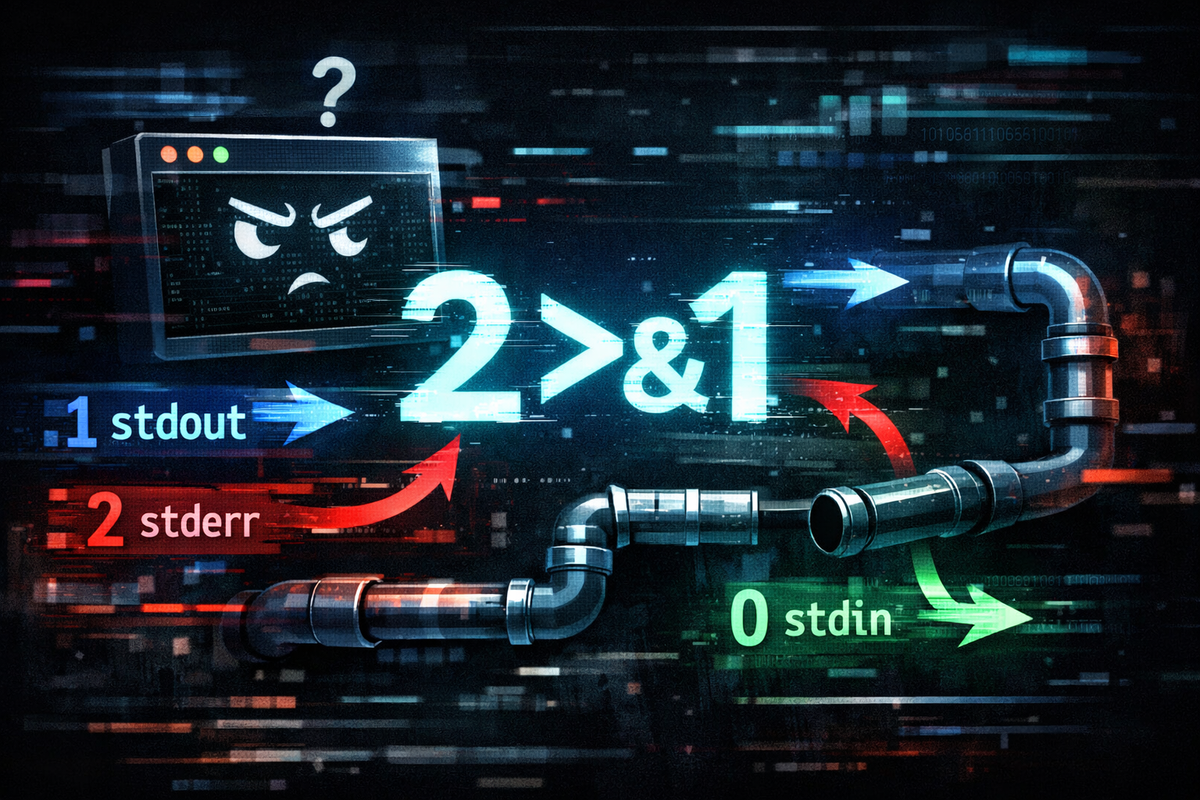
Why 2>&1 Is Always Confusing — The Starting Point of a Syntax Used Without Understanding
Most developers have used 2>&1 at least once, but very few can actually explain it. In many cases, this syntax is remembered as “combining errors into output.” However, this explanation only describes the result and does not explain why it behaves that way. As a result, the moment the same syntax produces different outcomes depending on the situation, understanding immediately collapses. The reason to read this document is simple. It is to understand 2>&1 instead of memorizing it.
The problem is that this syntax is not a simple string, but an expression that directly manipulates the Linux I/O structure internally. In other words, 2>&1 does not change the output result, but reconstructs the path that the output follows. If this distinction is not understood, it becomes impossible to explain why the result changes depending on the execution order of commands. For example, the following two commands appear very similar on the surface, but they produce completely different results in reality.
command > file 2>&1
command 2>&1 > file
In the first command, stdout is redirected to the file first, and then stderr follows that location. In the second command, stderr follows the existing stdout first, and then only stdout is redirected to the file. This difference is not a matter of syntax, but a matter of “when and what is referenced.” In other words, 2>&1 is not a syntax that produces a fixed result, but a dynamic structure that changes depending on the execution timing. This is where most confusion arises.
To solve this problem, it is not enough to explain 2>&1 itself. The underlying structure beneath it must be understood. A simple explanation like “combining outputs” cannot explain this behavior. To understand why this syntax behaves this way, we must first address the fact that we have misunderstood the concept of output itself. The next step is to break down that misunderstanding.
Why We Learn 2>&1 Incorrectly — Because It Is Learned as a Pattern, Not a Concept
Most developers first encounter Linux I/O not through concepts, but through usage patterns. That is, they receive a rough explanation of what stdout and stderr are, and then 2>&1 is presented as something that “works when used like this.” This approach helps in quickly obtaining results, but it does not help in understanding the structure. As a result, 2>&1 is remembered as a syntax pattern, and its meaning remains detached from its actual behavior.
The problem with this learning method becomes apparent in edge cases. It works fine in basic usage, but as soon as conditions change slightly, the result becomes unpredictable. For example, when used with pipes or when the order of redirection changes, most developers cannot intuitively explain the result. This is not because they do not know the syntax, but because they do not understand the structure on which the syntax operates. In other words, we know how to use 2>&1, but we do not know why it behaves that way.
This issue is not simply a matter of learning style, but arises from learning concepts in isolation. stdout, stderr, pipes, and redirection are explained separately, but in reality, they operate within a single system. However, because this connection is omitted during learning, each concept is perceived as independent. As a result, when multiple concepts operate simultaneously, such as in 2>&1, understanding breaks down. The essence of the problem is not that the syntax is difficult, but that the concepts are not connected.
Now, this connection must be restored. To do that, we must first redefine what output actually is. We need to understand precisely what we think output is, and how it truly operates. The next step addresses exactly this point.
The Core Problem — We Misunderstand “Output” Itself
Most developers think that output goes to the screen. That is, when a program runs, the result is displayed in the terminal, and that is considered the entirety of output. However, this understanding is not sufficient to explain the Linux I/O structure. Output is not fixed to a specific destination, but is merely a path through which data flows. In other words, output is not about “going somewhere,” but about “being able to go anywhere.”
In Linux, output is divided into two streams: stdout and stderr. These streams are not fixed to a specific device, but can be connected to various targets such as files, terminals, or pipes. A program simply writes data to these streams, and where that data is delivered is determined by a separate structure. If this structure is not understood, one may assume that output always behaves in the same way. And this assumption is precisely what causes the failure to understand 2>&1.
At this point, an important shift is required. Output is not a result, but a flow. In other words, a program does not “produce” results, but “emits” data. From this perspective, stdout and stderr are not merely output channels, but paths through which data travels. And these paths can be changed at any time. Redirection changes these paths, and pipes connect these paths to other programs. In other words, everything operates on top of flow.
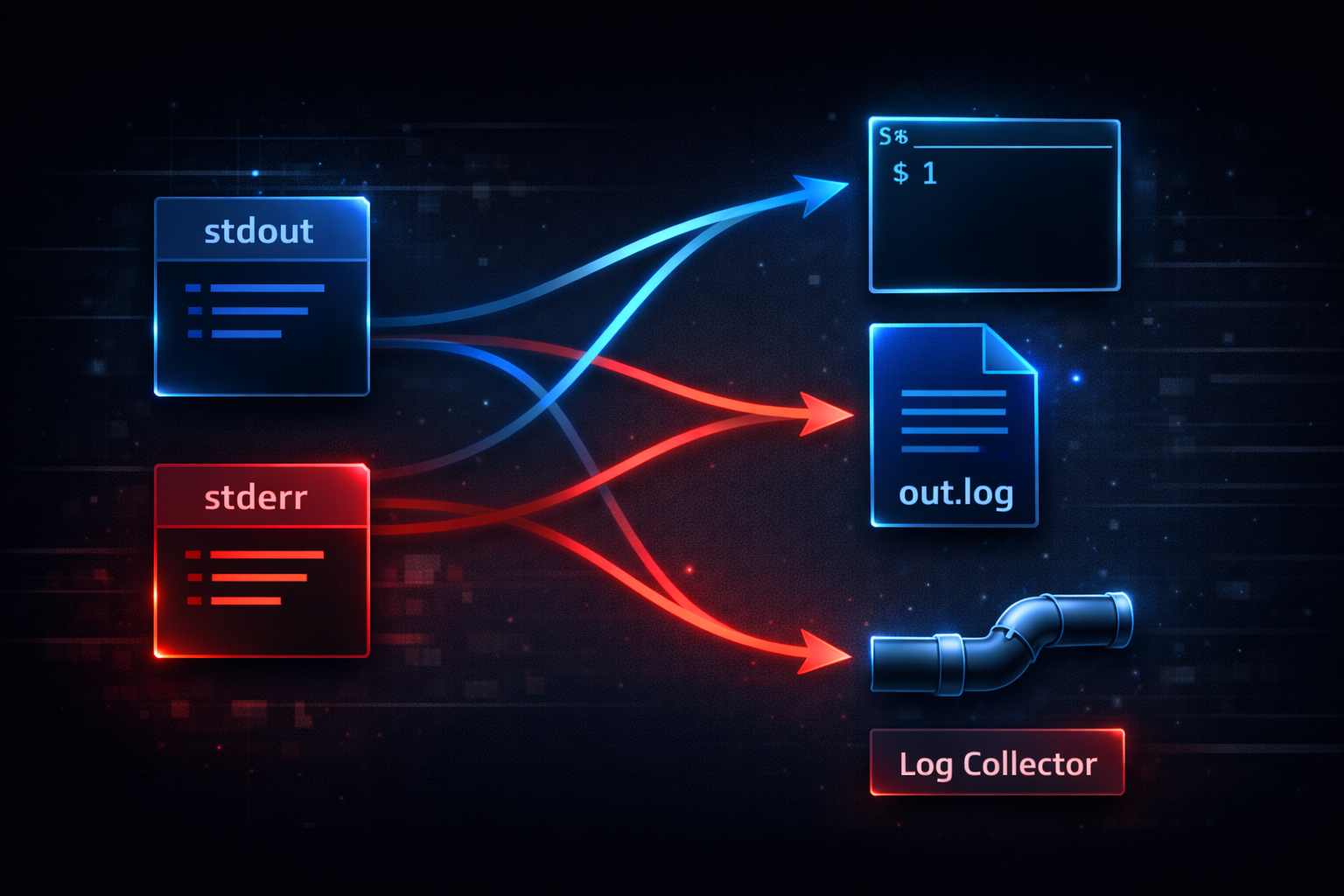
At this point, the definition of output has changed. Output is no longer the result displayed on the screen, but a flow of data moving within the system. Once this perspective is established, it becomes possible to understand the next step, the file descriptor structure. And the moment that structure is understood, 2>&1 is no longer a syntax to memorize, but a behavior that can be naturally explained.
Rebuilding the Linux I/O Model — The Relationship Between stdin, stdout, and stderr
To understand 2>&1, there is a prerequisite that must be clearly established. stdout and stderr are not merely different “types of output.” They are structurally independent paths within the system. In many cases, stdout is explained as standard output and stderr as error output, but this distinction is functional rather than structural. In reality, both outputs are managed separately through distinct file descriptors. Without understanding this structure, it is impossible to explain how redirection and 2>&1 actually work.
In Linux, all input and output are managed through numerical identifiers called file descriptors. stdin is file descriptor 0, stdout is 1, and stderr is 2. These numbers are not just labels. Each represents an independent data channel. When a program writes to stdout, it is internally performing a write operation on file descriptor 1. Similarly, stderr outputs are written through file descriptor 2. This means both outputs follow the same mechanism, but they are transmitted through completely separate paths.
The critical point here is that these file descriptors are not permanently bound to a specific destination. By default, stdout and stderr point to the terminal, but through redirection, they can be reassigned to files or other targets. This means output does not follow a fixed path. It is dynamically determined at execution time based on how the process is configured. This behavior is external to the program’s logic. As a result, the same program can produce entirely different output behaviors depending on how it is executed.
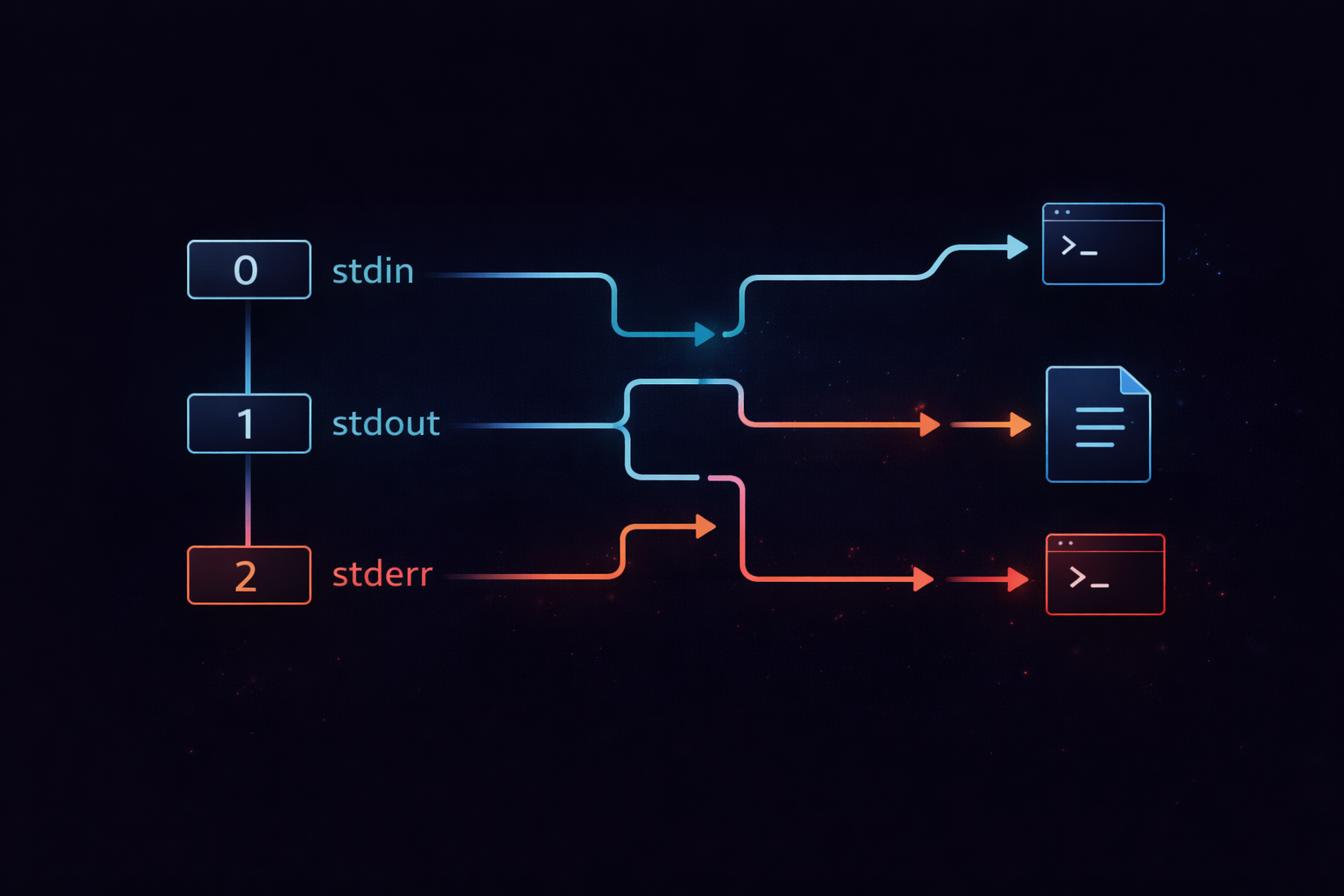
▶ To understand this concept more deeply: Understanding Linux I/O Streams — stdin, stdout, stderr, and Redirection
Now it is clear that stdout and stderr are independent paths. The next step is to understand how these paths are actually reassigned and connected in practice. At that point, it becomes evident that redirection is not simply about changing output, but about restructuring the flow itself.
The Critical Shift — 2>&1 Does Not “Merge,” It Reassigns References
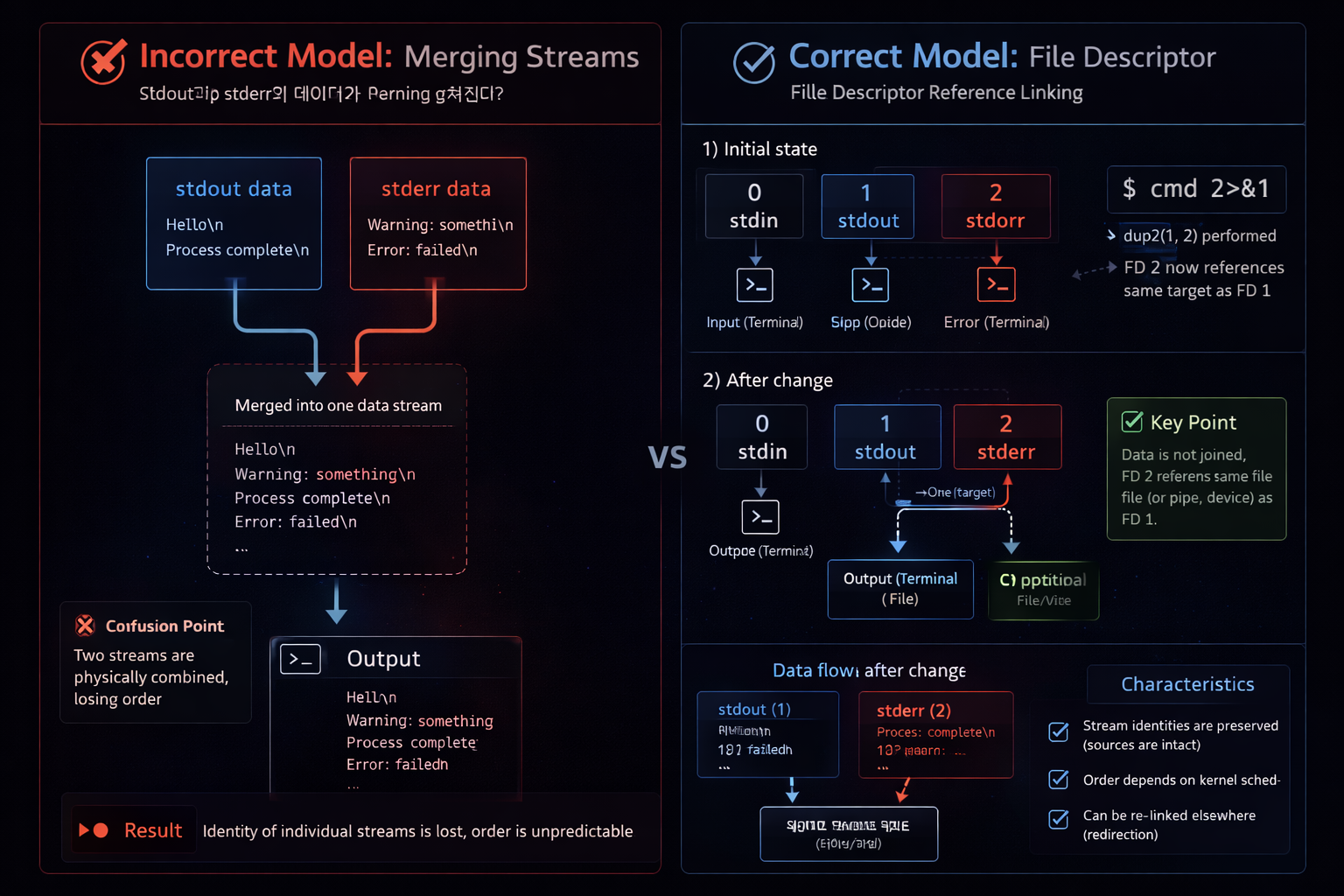
Explaining 2>&1 as “merging stderr into stdout” is fundamentally insufficient. That description only captures the result, not the internal behavior. The accurate interpretation is that stderr does not take on the same “value” as stdout. Instead, it is configured to reference the same target that stdout currently points to. This distinction is essential. Copying a value and sharing a reference are completely different operations.
In Linux, a file descriptor represents a reference to a specific target. If stdout points to a file, then file descriptor 1 maintains a reference to that file. When 2>&1 is applied, stderr is reassigned to reference the same target that stdout is currently pointing to. This means stderr does not dynamically follow future changes to stdout. Instead, it captures the target at that exact moment and shares it. After this reassignment, both descriptors operate independently, even though they reference the same destination.
This explains why 2>&1 is highly sensitive to execution order. File descriptors are configured sequentially during command parsing. The timing of when a reference is established determines the final behavior. Therefore, 2>&1 is not a static transformation. It is a context-dependent operation that binds stderr to the current state of stdout at a specific point in execution.
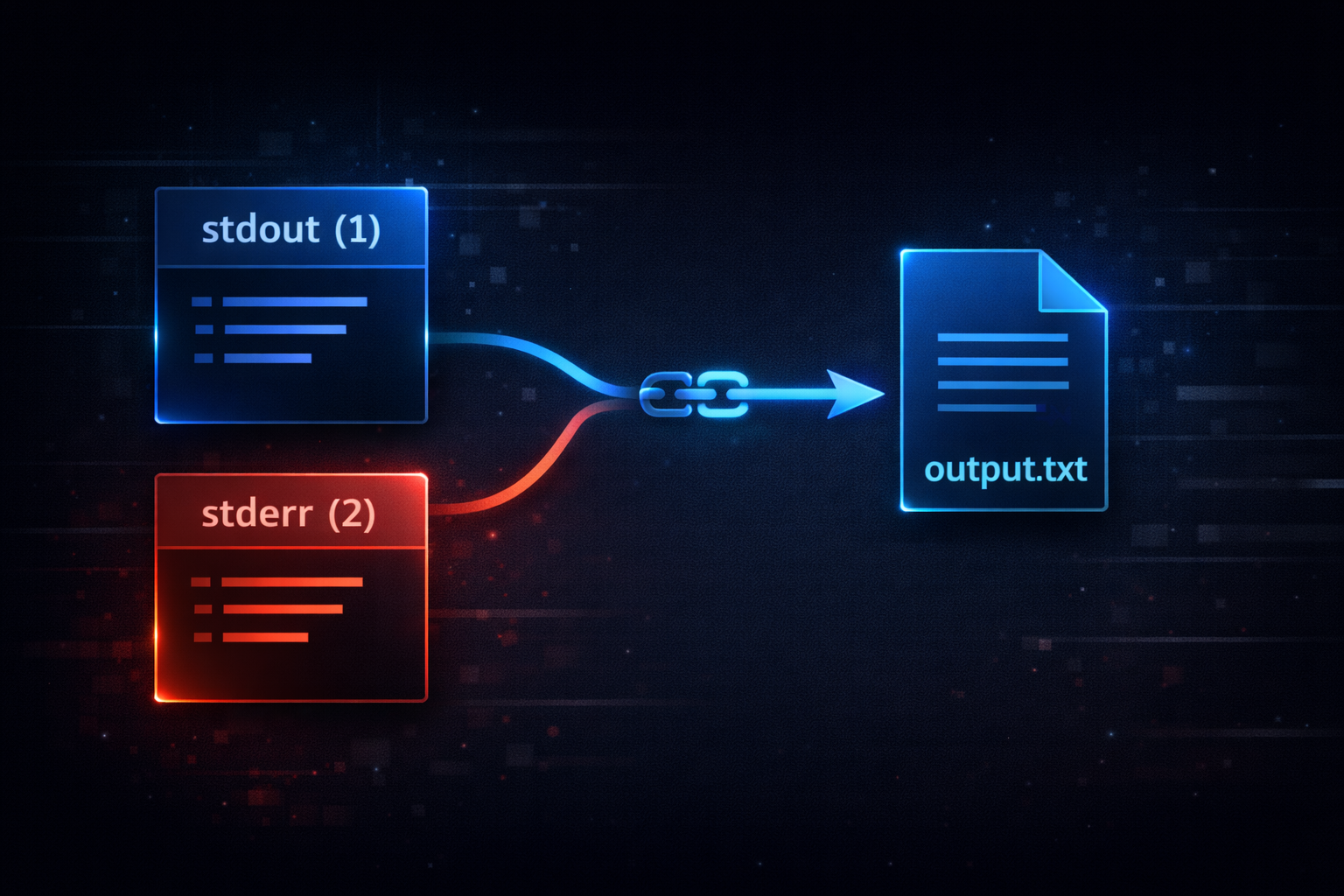
At this point, the essence of 2>&1 is clear. It does not combine data streams. It aligns their underlying paths. The next step is to examine how this behavior changes depending on command execution order. Only then can we fully explain why identical syntax can produce different results.
Why Order Changes the Result — The Problem of Execution Timing
The primary reason many developers fail to understand 2>&1 is that they cannot explain how execution order affects the outcome. The two commands examined earlier use the same elements, yet produce different results because the order of operations changes. This difference is not syntactic. It is rooted in when each file descriptor establishes its reference. The Linux shell processes redirection and file descriptor manipulation strictly from left to right. This sequence determines the final state.
command > file 2>&1
In this case, stdout is first redirected to a file. This means file descriptor 1 now points to the file. Then 2>&1 is executed, causing stderr to reference whatever stdout currently points to, which is the file. As a result, both stdout and stderr are written to the file. Now consider the following command.
command 2>&1 > file
Here, stderr is first reassigned to follow stdout. At this moment, stdout still points to the terminal. Therefore, stderr becomes linked to the terminal. After that, stdout is redirected to a file. This change only affects file descriptor 1. stderr remains connected to the terminal because its reference was already established earlier. The result is that stdout is written to the file, while stderr is still printed to the terminal.
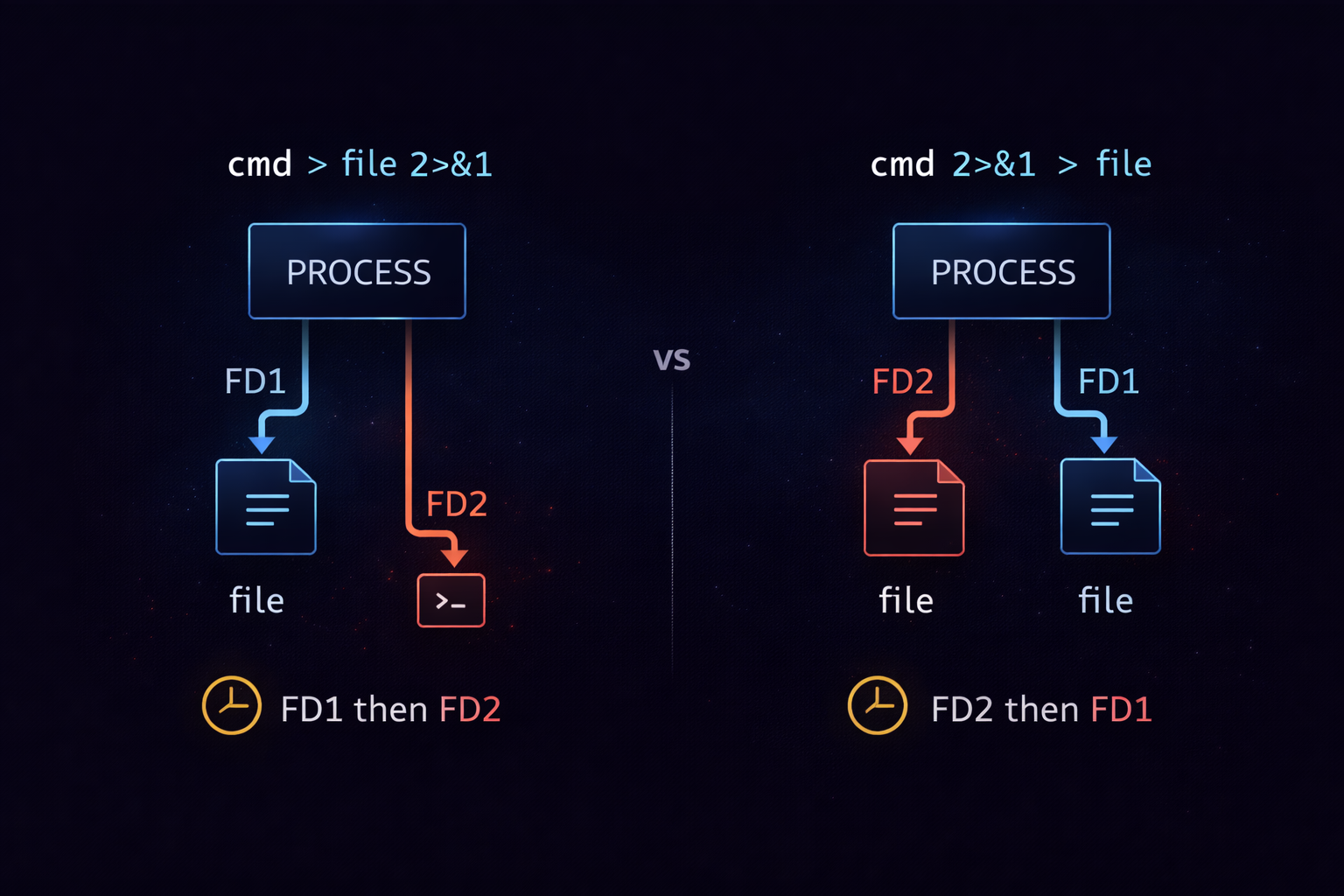
Understanding this structure removes any ambiguity around 2>&1. It is not an exceptional rule. It is simply the natural consequence of how file descriptors are assigned in sequence. Linux I/O operates as a state-based system, where each step defines the context for the next. Once this perspective is established, the same principles can be applied to pipes and more complex redirection scenarios.
What changes when pipe meets 2>&1 — separation and composition of data flow
Understanding 2>&1 does not automatically mean you understand pipe. In many cases, confusion actually begins again when pipe is introduced. The reason is that pipe is often understood only as “passing output to the next command.” In reality, pipe operates only on stdout. stderr does not pass through the pipe by default. If this fact is not understood, it is impossible to explain why 2>&1 must be positioned before the pipe.
A pipe creates a new connection between two processes. This connection is implemented at the file descriptor level. The stdout of the first command is connected to the stdin of the second command. At this point, stderr is not affected at all. In other words, pipe reconfigures only the stdout path, while stderr maintains its existing path. Because of this structure, error messages are still printed to the terminal, while only normal output is passed to the next command.
command | grep something
In this command, grep receives only the stdout of command as input. stderr is still printed to the terminal. Therefore, error messages do not pass through grep. This behavior may not feel intuitive, but it is very clear from the file descriptor perspective. The pipe connects fd1 only, and leaves fd2 unchanged. Because of this, if you want stderr to pass through the pipe, an additional operation is required.
This is where 2>&1 comes in. If stderr is connected to the same target as stdout, then the pipe will effectively receive both outputs. The important point is the order. In command 2>&1 | grep something, stderr is first connected to stdout, and then the pipe connects stdout. As a result, both outputs are passed to grep. In contrast, command | grep something 2>&1 behaves completely differently. In this case, 2>&1 is processed inside grep and has no effect on the stderr of command.
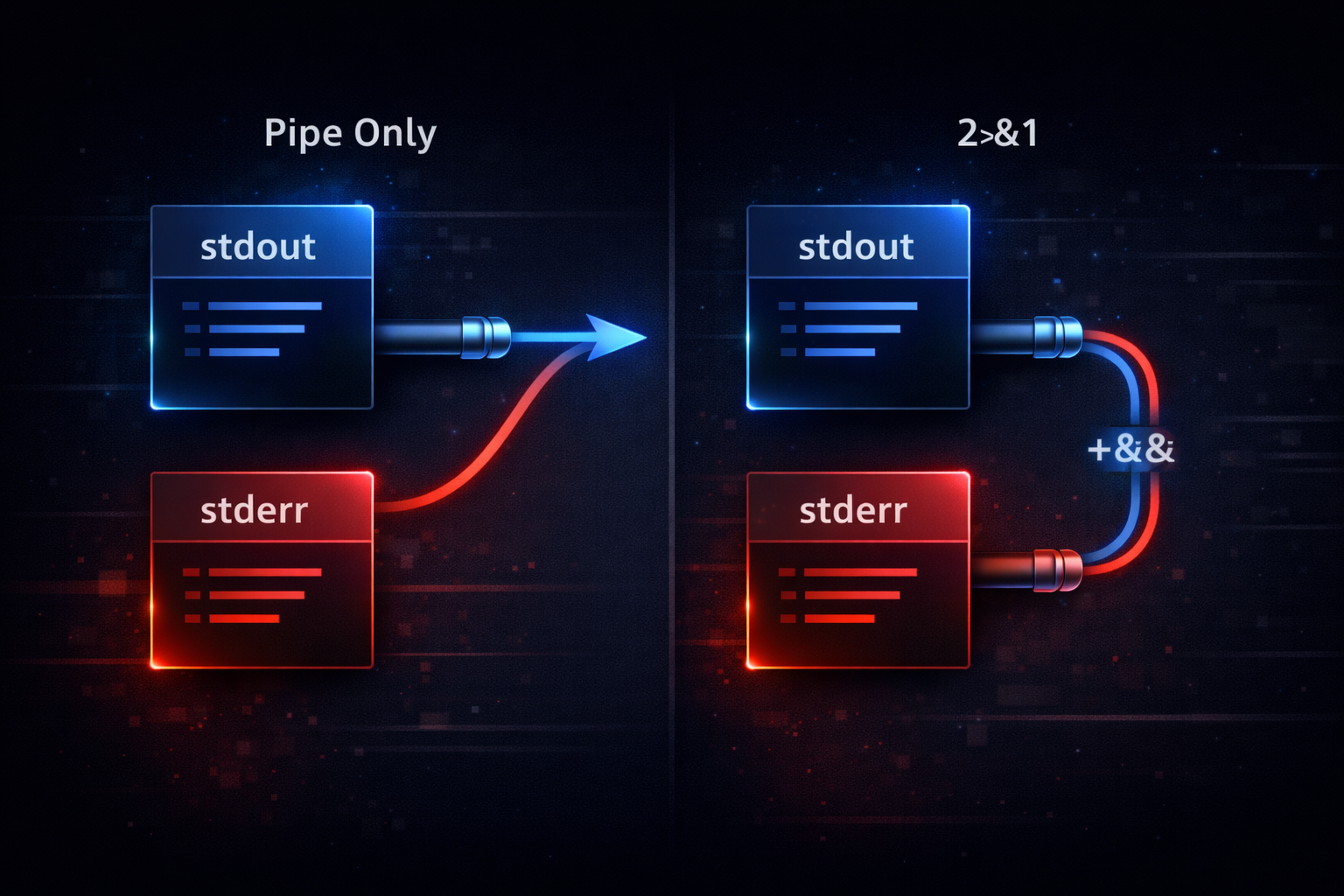
Now the relationship between pipe and 2>&1 is no longer a simple combination, but a question of how to merge different paths. In the next step, this structure is examined in real-world usage, where its role shifts from syntax to a design tool.
Why 2>&1 is used in practice — logging, debugging, and reproducibility
2>&1 is not just syntax. It is a tool for controlling execution results. In practice, the flow of output often matters more than the content of output. This is especially true in logging, failure analysis, and batch processing. In these cases, whether stdout and stderr are separated or combined directly affects how results are interpreted. Here, 2>&1 is used as a mechanism to explicitly control output paths.
A representative example is log file generation. If only stdout is redirected to a file while stderr remains in the terminal, the log becomes incomplete. If only stderr is redirected, the normal execution flow cannot be observed. Therefore, in most cases, both outputs are combined into a single file. The common pattern used here is > file 2>&1. This command sends stdout to a file and connects stderr to the same file. As a result, all output is recorded in a single log.
command > app.log 2>&1
This structure is not just for convenience. It is for ensuring reproducibility. If the same input does not produce a consistent log, it becomes impossible to reproduce problems. If stderr is separated, the log alone cannot fully reconstruct the situation. Therefore, controlling output paths is essential in practice. 2>&1 is the most fundamental tool that makes this control possible.
Another important use case is debugging. All outputs of a command can be passed to another program for analysis. For example, if you want to filter including error messages using grep, stderr must be merged into stdout. In this case, a pattern such as command 2>&1 | grep error is used. This pattern is not just about string matching. It turns the entire execution flow into an analyzable stream.
▶ To understand this concept more deeply: What Is a Pipe (|)? A Clear Guide to the Linux Pipe Concept
In this way, 2>&1 is not just syntax. It is used as a tool for designing output flow. In the next step, the focus shifts to why this design is frequently misunderstood, and where incorrect mental models originate.
Why most explanations are wrong — the misleading model of “merging”
The primary reason developers fail to understand 2>&1 is that most explanations are result-oriented. Saying “stderr is merged into stdout” is intuitive, but it does not explain the structure. This expression only describes the visible result, and does not reveal what actually happens internally. Because of this, users cannot explain why the same command produces different results depending on order.
The core problem is that the term “merge” encourages a data-centric mental model. It leads to the misunderstanding that two outputs are combined into a single stream. In reality, no data is merged. Instead, the path is reconfigured. stderr simply references the same target as stdout. Without understanding this distinction, it is impossible to explain why identical syntax can produce different results.
Additionally, many resources omit the concept of file descriptors. This is often done to simplify explanations, but it ultimately prevents structural understanding. Without understanding file descriptors, redirection appears to be just “changing output.” In reality, it is reassigning output paths. This distinction is critical. Only by understanding paths can you explain pipe interaction, execution order, and reference behavior as a unified system.
▶ To understand this concept more deeply: Why grep, sort, and uniq Are Piped Together — The Core Pattern for Log Analysis
Ultimately, understanding 2>&1 is not about learning a single piece of syntax. It is about understanding the entire Linux I/O system structurally. Once this perspective is established, all redirection and pipe behavior can be interpreted through the same underlying principles. The next step is to connect this understanding into a unified system-level flow.
What Changes When You Understand Linux I/O Structurally — It Becomes a Predictable System
If you understand 2>&1, one important change occurs. You no longer need to memorize commands. Most developers treat redirection and pipes as “patterns to remember.” However, this approach breaks as soon as the situation changes slightly. The reason is that patterns are memorized, but the structure is not understood. In contrast, if you understand file descriptors and reference structures, you can predict results even in unfamiliar situations.
The core of this shift is the ability to always trace where output is going. stdout and stderr each have independent paths. These paths can be modified through redirection. The expression 2>&1 makes these paths shared. A pipe connects only the stdout path to the next process. By combining these three principles, you can determine the result of any command. What matters is not remembering the outcome, but tracing what each file descriptor points to at each step.
When encountering a complex command, you no longer ask “will this work.” Instead, you check where stdout is pointing. Then you check when stderr referenced stdout. With just these two questions, you can reconstruct the entire flow. This approach does not simply improve command usage. It changes how you interpret system behavior itself. Linux I/O is not something to memorize. It is something to understand as a state-based system.
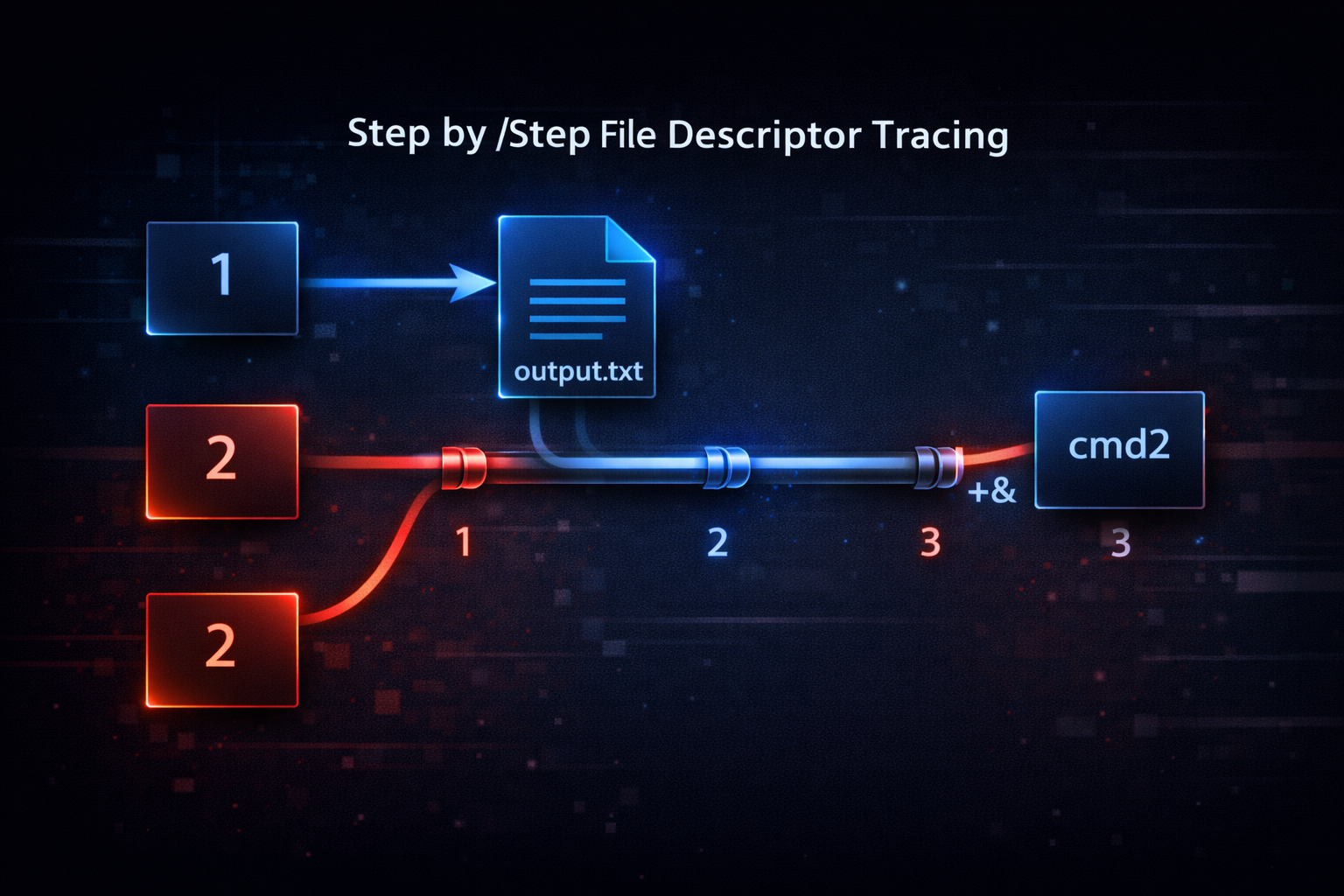
This perspective does not apply only to shell commands. Internally, every program operates on the same file descriptor model. Understanding this structure allows you to interpret system logs, inter-process communication, and stream-based processing in the same way. The next step is to extend this understanding into broader system design concepts.
Extended Concept — File Descriptors Are Not Just Output, but a System Interface
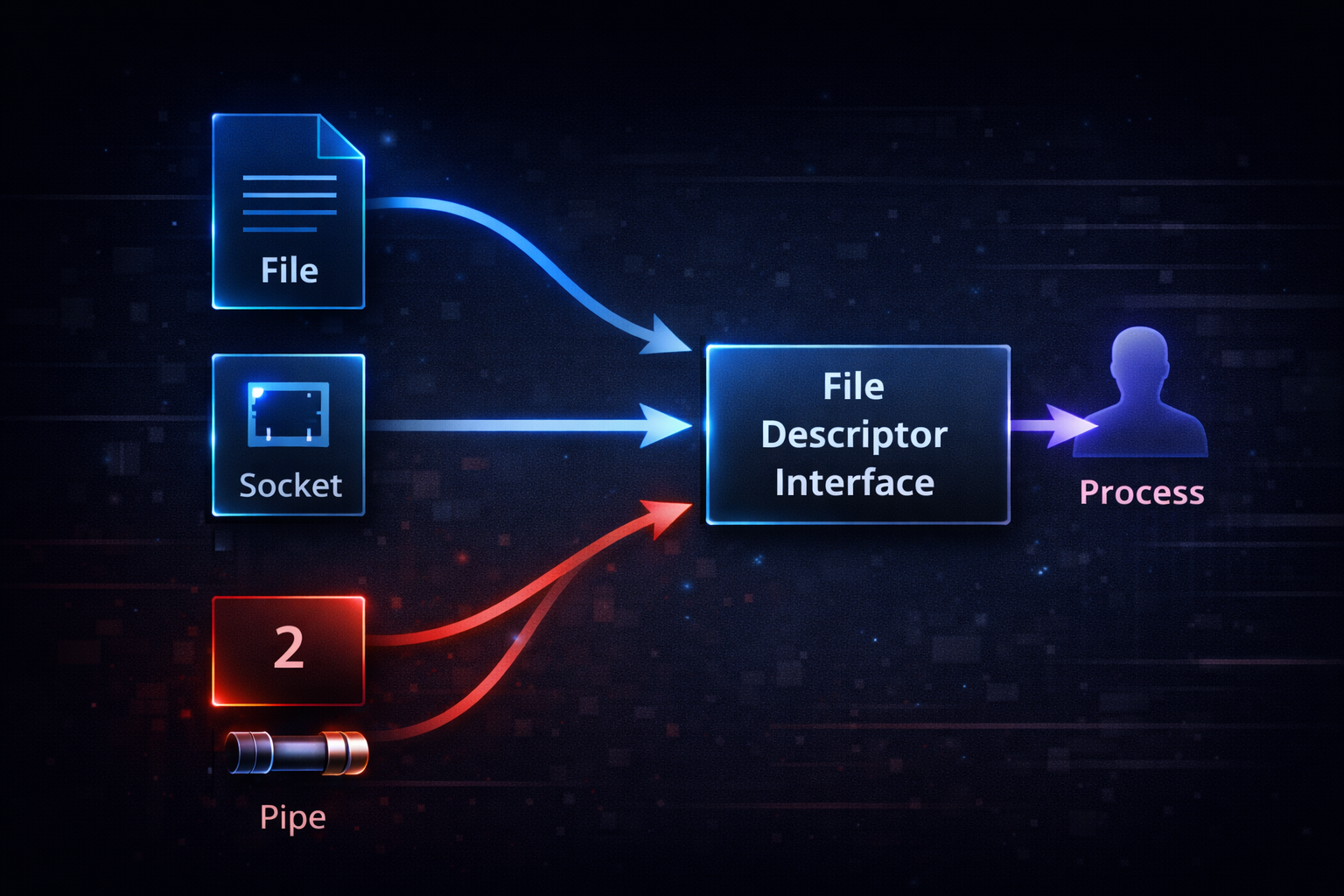
When Linux I/O is understood structurally, it becomes clear that file descriptors are not just a means of input and output. They are an interface between a process and the outside world. stdout and stderr are only a subset of this model. In reality, file descriptors can connect to files, sockets, pipes, and devices. The same mechanism is used to interact with completely different system components.
The key idea is the Linux design principle that everything is treated like a file. A program does not need to know what the target is. It only performs a write operation on a file descriptor. The target may be a file, a network socket, or another process. This abstraction is what makes pipes and redirection work naturally. The expression 2>&1 is also built on this same abstraction. It is not a special feature. It is part of the system’s core design.
From this perspective, 2>&1 is not just syntax. It is an operation that reconfigures interface connections. When stderr shares the same target as stdout, it means both interfaces are connected to the same destination. This connection becomes a way to control data flow. For example, logs can be sent not only to files, but also over the network or to other processes. All of this is implemented using the same mechanism. File descriptors are the fundamental units that connect system components.
▶ To understand this concept more deeply: What Is a Pipe (|)? A Clear Guide to the Linux Pipe Concept
At this point, 2>&1 is no longer an isolated concept. It is one example that naturally emerges from understanding the entire Linux I/O system. With this perspective, any new command or situation can be interpreted using the same principles. What matters is not the syntax itself, but the system structure in which that syntax exists.
